

Want to learn about product variations and how to get the best out of them on your online store? This beginner-friendly guide is here to help.
If you’re new to ecommerce or haven’t reviewed your product variations in a while, you can easily get confused by all the jargon. This limits how well you can organize and present product variations to avoid frustrating customers.
? So, we’ll put all the jargon aside and walk you through what product variations are and how to use them in this guide.
Here’s what we’ll cover:
- What product variations are (including examples).
- The benefits of using product variations in your ecommerce store.
- How to use product variations in your online store.
Whether you’re a beginner or need a refresher on product variations, you’ll find this guide useful. Let’s jump right in and look at what product variations are.

What are product variations?
Product variations are the different forms or versions of a single product. These are based on specific product attributes, which are the characteristics of a product, such as size, color, material, or style. Each of the sizes, colors, materials, etc., are different variations of the single product.
To get a grasp of what product variations are, take a t-shirt that comes in various sizes and different colors as an example:
- Sizes: Medium, large, small, etc.
- Color: Blue, red, white, etc.
You can have up to 9 variations of this product, distinct from each other. For example, a white medium, red large, white large, blue medium, and so on. We’ll cover more examples of this later in this guide.
With a basic understanding of what variations are, let’s look at some of the key points that define them.

Key points about product variations
- Product variations come from variable products. A variable product is a product type that comes in multiple forms and versions. They typically have several attributes (color, shape, etc.), and these attributes are what define variations. Each attribute has multiple variations (color options: red, blue, etc.), which can be combined to create a product variant.
- Each variation has its own stock-keeping unit (SKU). To manage inventory easily and prevent understocking, each variation has an SKU. When a customer purchases a variation, its stock level will be automatically deducted.
- The product variant at the checkout is the result of the customer’s choices. Customers pick variable product options based on their preferences and add the product to their shopping carts. So what they check out with is a product of these choices.
With all this in mind, what do product variations look like on the product page?
What product variations look like on the product page
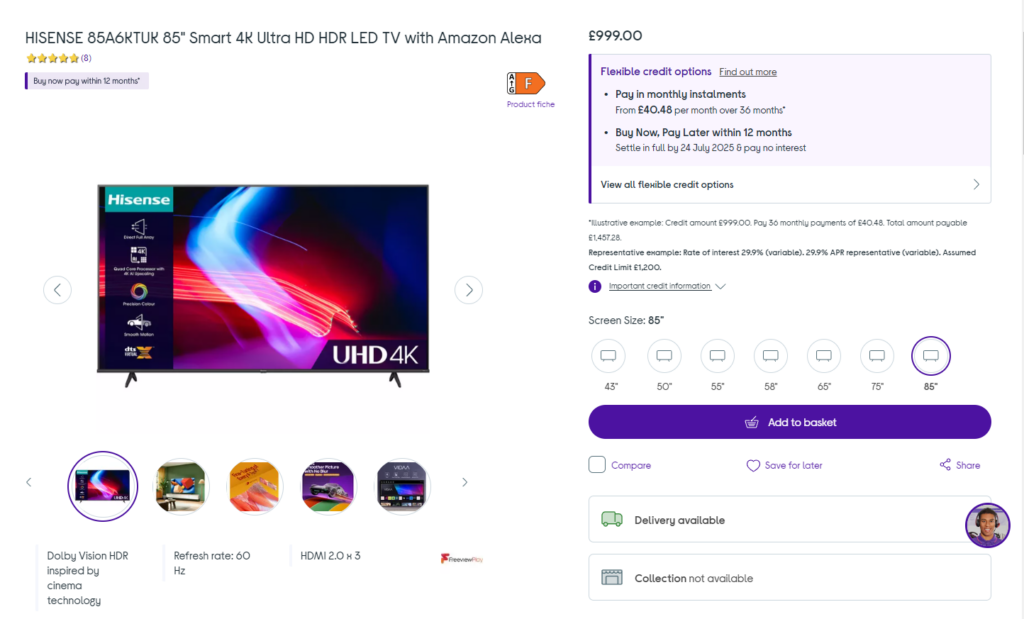
Product variations have a unified product listing on the product details page. This means they are displayed as selectable options for the parent variable product on this page. As an ecommerce store owner, you’ll typically do this using dropdowns and sometimes plain text.

For instance, the color attribute can be the title of a dropdown menu. Then, the color options will be revealed when the customer clicks to expand this menu. Dropdown menus are the standard method for displaying product variations, but they don’t deliver the best variable product browsing and shopping experience.
Fortunately, we’ll see how to improve how we present variations to customers later in this guide.

What is an example of a variable product?
Earlier on, we saw that you can have a t-shirt with multiple colors and sizes as a basic example of a variable product. There are many more examples spread across different industries.
So, apart from t-shirts with size and color options, here are other examples of variable products:
- Mobile phones. You can have mobile phones, such as the Apple iPhone 14, available in different storage options, such as 128 GB, 256 GB, and 512 GB. You can also have them in different colors, like midnight(black), red, blue, purple, etc.
- Home goods. This includes sofas in different sizes, for instance, 2-seaters and 3-seaters, and materials like leather or fabric. You can also have bedsheets in different sizes and made with different materials in the same way.

Our iPhone 14 example is a real-world variable product. Another example of this is Starbucks coffee. It sells coffee in different drink sizes, namely Tall, Grande, Venti, and Trenta. It also offers temperature variations: hot, iced, and blended.
What is the difference between product options and product variants?
Before moving forward, let’s first address the elephant in the room: the difference between product options and product variants.
This is because it’s not uncommon to see these two terms used interchangeably. Shopify uses product variants to represent product options, but there is a subtle difference.
A product option refers to the choices available for each attribute of the variable product. In our t-shirt example, the product options can be red, blue, or white color options.

On the other hand, a product variant is a specific combination of product options that result in a unique product. In other words, a product variant is what the customer gets after selecting a variable product’s options according to their preference. For example, a medium-sized red T-shirt.
All the jargon aside, product options are the building blocks, while product variants are the complete product created by combining these options.
That said, let’s move on to the benefits of product variations and see why you should use them in your ecommerce store.
What are the benefits of using product variations in your ecommerce store?
Using product variations has plenty of benefits for your ecommerce store. Here are some of the main ones that make a strong case for using them in your store.
They improve your customers’ experience
Whether you’re just starting out with ecommerce or you’re a seasoned online retailer, you know that user experience is key.
? In fact, a Forbes Insights study confirms that 74% of customers will likely buy purely based on experience.
A key part of your customer’s experience is that they should be able to find what they’re looking for easily. Product variations ensure this. It saves them the time they would otherwise spend scouring through different product pages looking for their preferred variation.
They’ll access all the information on a single web page.
They drive sales and conversions
Increased sales and conversions from using product variations boils down to enabling customers to find their preferred variations easily. When customers don’t overexert themselves to find products, they will likely buy from you.
? 50% of potential sales are lost simply because customers can’t find what they’re looking for.
Fortunately, product variations play a key role in mitigating this.
They have SEO benefits
Well-organized product variations are not just good for navigation. They have several SEO benefits as well.
First, each product variation allows you to target more long-tail keywords. For example, ‘blue v-neck large t-shirt,’ ‘red cotton crewneck t-shirt,’ etc., for a variable t-shirt product.
Having multiple variations enriches your single product page’s content. This way, they are more valuable to search engines. Variations also reduce duplicate content and enhance internal linking – all of which improve your ecommerce site’s SEO.
? Variations allow you to optimize your online store for organic search, which is how 51% of customers find businesses.
Improved inventory management
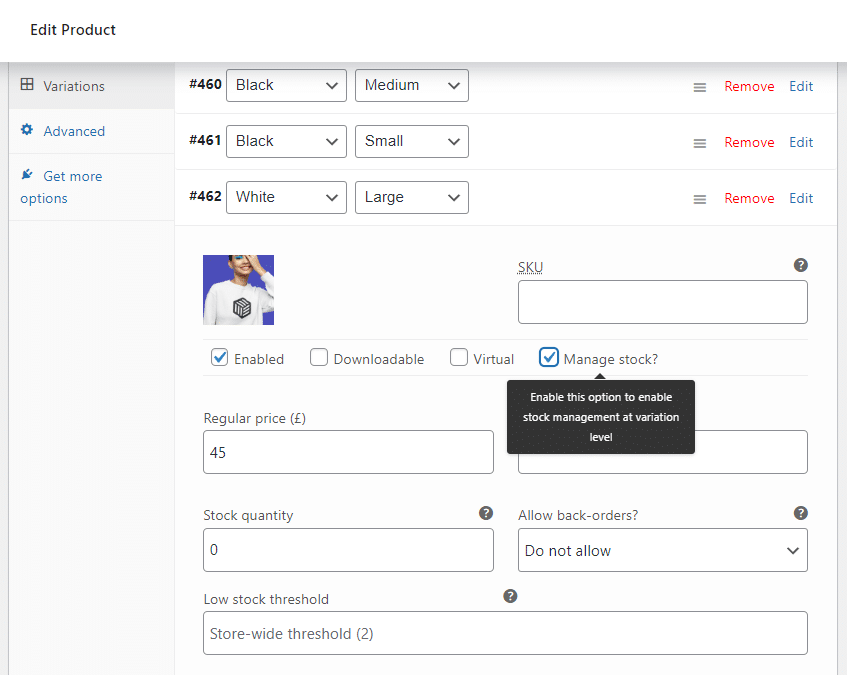
Each product variant has its own SKU. This makes it easy for you to keep tabs on the stock levels of each variation of individual products.
You don’t want to sell something you don’t have to your customers and ruin their experience with your business.
Variations help deliver personalized experiences to customers
Different customers will prefer different versions of variable products. Product variations are a way to provide personalized experiences to various customers. They get to choose the perfect fit from the options you provide.
Customers love personalized experiences, and there’s no shortage of data to support this.
? According to research, 90% of customers prefer brands that offer personalized experiences. They are more willing to buy from and become loyal to these brands.
Essentially, product variations are hugely beneficial in ecommerce, which is why global brands like Amazon and Best Buy use them to boost sales while improving shopping experience.
Now that we know the what and why, we’re ready to jump into how to use product variations in your online store.
How to use product variations in your online store
Using product variations is pretty simple, regardless of the ecommerce platform you use. Both WooCommerce and Shopify have simple processes in place for creating different variations of individual products.
In this section, we’ll cover:
- What product variations are in WooCommerce and walk you through how to use and get the best out of them.
- What product variations are in Shopify.
So, here is what variations in WooCommerce are.
What are WooCommerce product variations?
By now you know what product variations in ecommerce are. So what are they, with regard to WooCommerce?
WooCommerce product variations aren’t any different. They’re a specific implementation of product variations in WooCommerce.
They allow you to create multiple versions of single products, each with unique attributes like the ones we’ve discussed previously. Then, add various options to these attributes, which customers can choose from to create their preferred product variant.
How WooCommerce product variations work
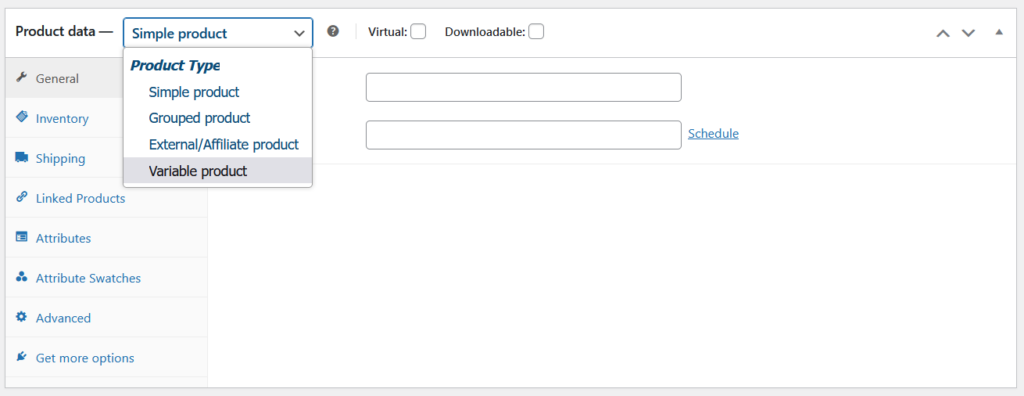
In the default setup, WooCommerce allows you to create up to 6 different types of products, one of them being variable products.
You can create attributes for each variable product and add product options to them accordingly.
WooCommerce has two different types of product attributes:
- Global product attributes. This means generic attributes you create and assign to different products across your online store. These attributes are not just for variable product browsing. You can also use them as filters on your shop page. Great examples of global product attributes are size and color because these values are shared across multiple products on your WordPress site.
- Custom product attributes. These attributes are specific to individual products and will only be used for the product in question.
WooCommerce has a dedicated section for creating global product attributes. But for custom product attributes, you’ll create them when editing a variable product.
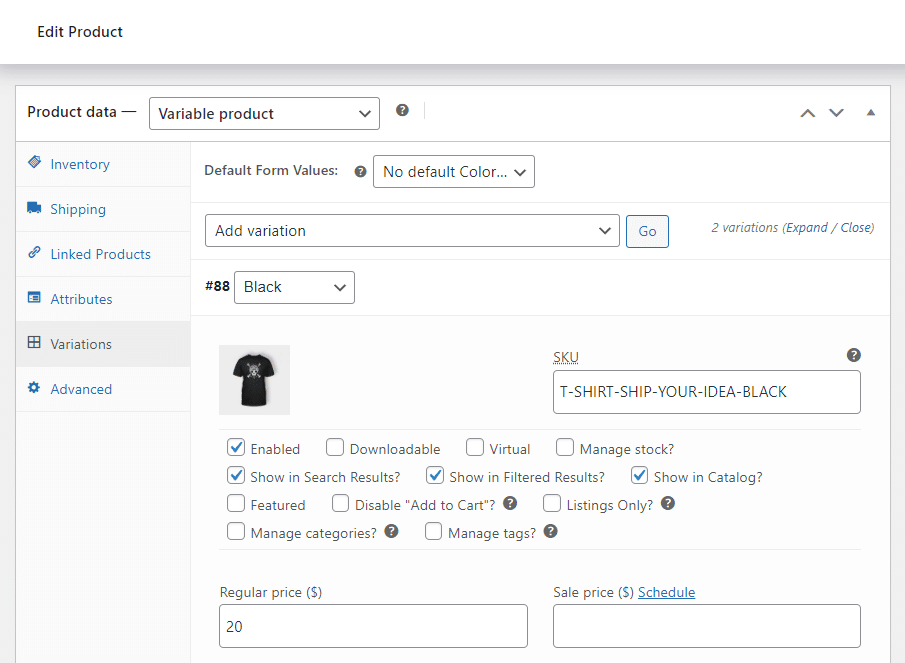
Product attributes aside, WooCommerce gives you control over the variations’ stock, images, prices, and more. You can add SKUs for each variation, set different prices (for different sizes or materials), and add images for each variation.
So that’s how WooCommerce product variations work. Next up, let’s see how to use them in your WooCommerce store.
How to use variations in your WooCommerce store
As mentioned earlier, using product variations in WooCommerce is pretty simple.
At this point, you know that you can do it in two ways:
- Creating global product attributes and assigning them to variable products.
- Creating variations from custom product attributes.
Creating product variations from global product attributes
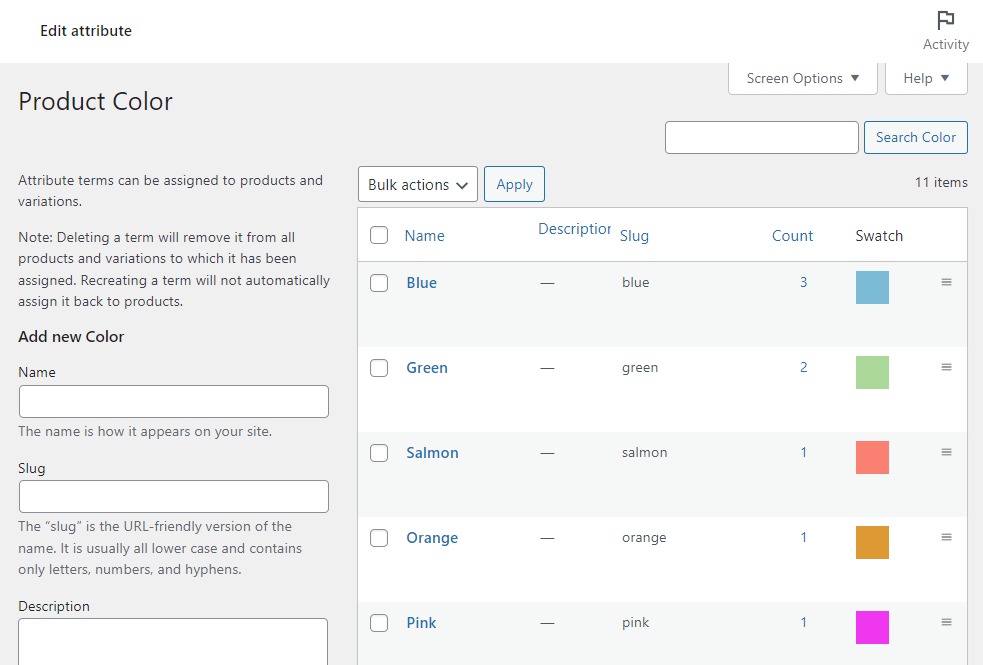
If your product attributes apply across different products, using global attributes to create variations is the best way to go. You can do it from the Products > Attributes > Add new attribute section on your WordPress dashboard.
On this page, you’ll be prompted to name the attribute (for example, color or size) and the values (for instance, color options: red, blue, green, etc.). After creating the attribute, you’ll need to create a variable product and assign these attributes to it.
Creating variations from custom product attributes
If you want to create attributes specific to a given variable product, you’ll do it when creating or editing it. To do this, go to the Product > Add New product section on your WordPress dashboard.
Do the standard stuff like naming and adding a description for the product. In the product data section, select ‘Variable product’. Go straight to the Attributes tab in this section.
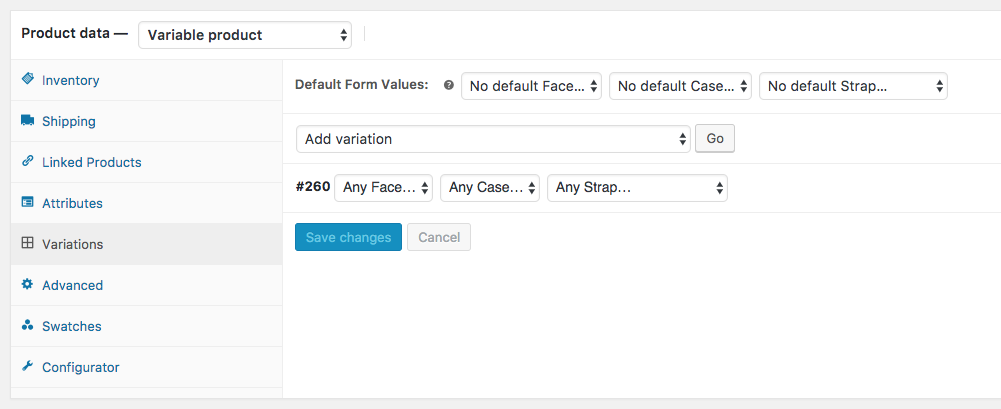
You’ll see two options here:
- Add new. To create a custom attribute, you’ll click here and name it, plus add its values. For each attribute, you’ll add options and separate them with a vertical slash (|).
- Add existing. If you previously created global attributes, you can search for them from this input field and apply them to this product.
From the Variations tab, you can generate variations based on the attributes you created. Next, you can configure the variations further by adding a SKU and prices.
? This is a brief, takeaway-focused walkthrough of what you’ll have to do. We’ve covered this and much more in our How to Use Variable Products and Product Variations in WooCommerce guide.
Now that you’ve created your product variations don’t stop there. What WooCommerce offers by default is pretty basic, but you can make the most out of your product variations with the help of plugins.
The best WooCommerce product variations plugins
If you want to make the most out of your WooCommerce product variations, here are some plugins that can help.
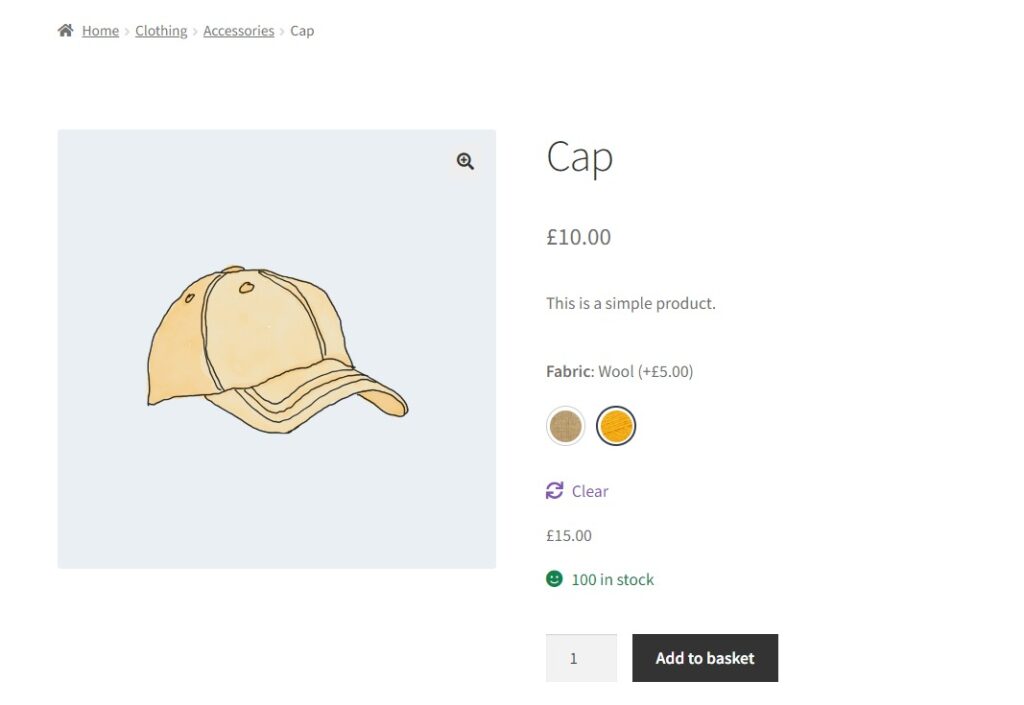
WooCommerce Attribute Swatches
By default, in WooCommerce, variable product options are shown as simple dropdowns on the product page. Depending on the theme you’re using, you’re very limited in what you can do to style these dropdowns.
These dropdowns don’t provide your shoppers with the best experience. We can do better by changing these dropdowns to color and image swatches.
To do this, you need the help of the WooCommerce Attribute Swatches plugin.
This plugin allows you to replace the standard WooCommerce product dropdowns with:
- Color swatches.
- Image swatches.
- Text buttons.
- Radio buttons.
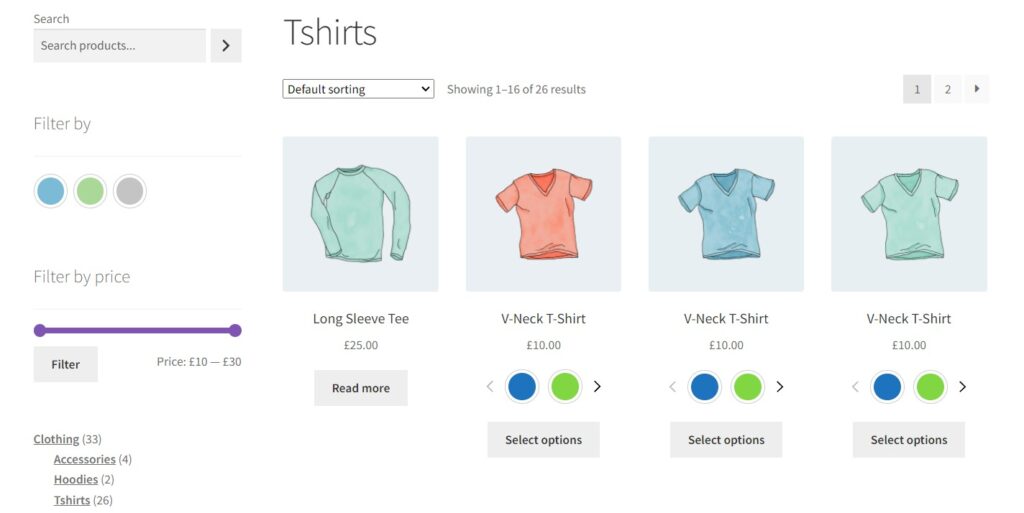
It has an intuitive color picker for your color variations. Also, it allows you to show a preview of each variation’s actual appearance with image swatches. This is perfect when you have variations based on different materials. Text-based variations aren’t left behind. You can upgrade these with text and radio button swatches.
As a result, customers will have a visual and user-friendly experience when selecting product variations. And we know how important this is in getting them to buy from you.
WooCommerce Attribute Swatches
Replace the default WooCommerce variation dropdown menu with variation swatches for WooCommerce. Add color swatches, image swatches, and modern text buttons to your variable product pages.
To help customers find what they’re looking for, this plugin allows you to display these swatches in the product filters and shop page. Customers will know what is available without having to visit the product page.
You’ll have an easier time creating swatches. You can create global swatches or swatches per product category and assign them to variable products.
WooCommerce Show Single Variations
If you have variable products only on the shop page or search results, customers might have a difficult time finding their preferred product variation. They would have to go through several clicks to get to the product page and look for it. But, we can make their experience better with the WoooCommerce Show Single Variations plugin.
This plugin allows you to display them as individual products on the:
- Shop page.
- Category pages.
- Search results.
- Filtered results.
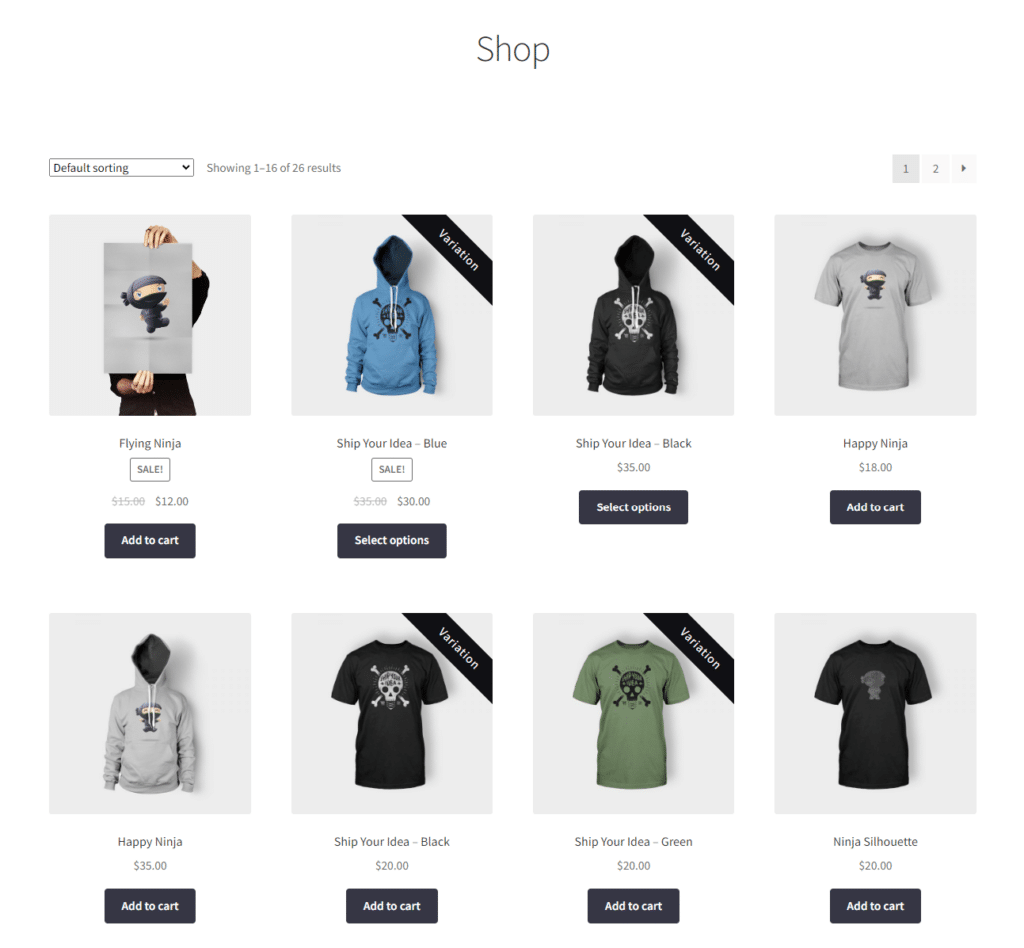
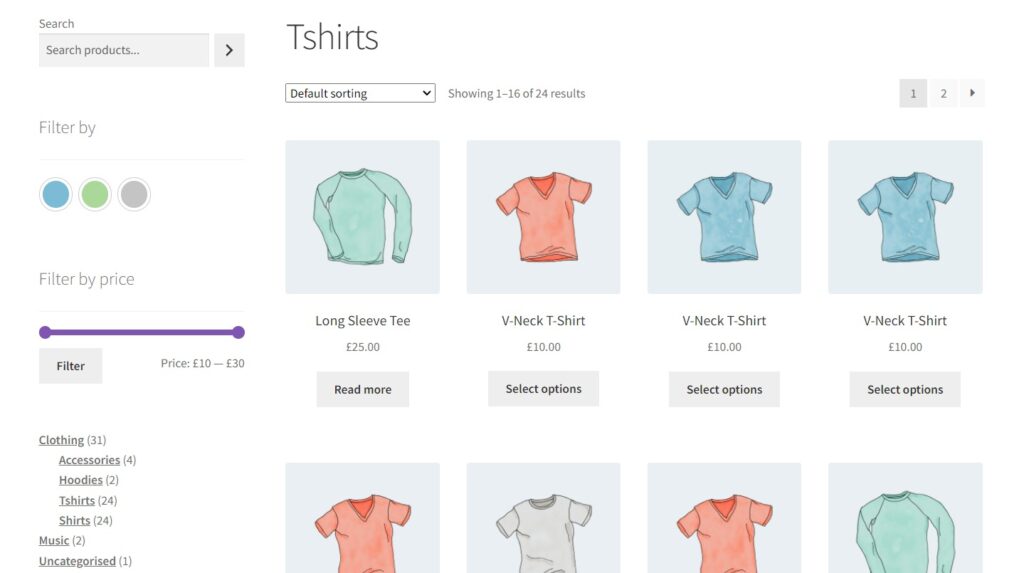
When buyers visit your shop page, they’ll see product variations displayed in the same way simple products appear here.
This gives your customers a straightforward shopping experience, as they can add variations to their shopping carts right from the shop page. They don’t have to go through product page by product page to find what they prefer. By saving your customers’ clicks, you will limit their chances of getting frustrated with your WooCommerce store.
WooCommerce Show Single Variations
Show WooCommerce variations as single products on the shop page, category pages, search results, and filtered results with WooCommerce Show Single Variations.
Product variations will also show up as individual products in search and filter results. This makes for more accurate search results. On top of all this, Show Single Variations gives you control over variation titles. You can change the default titles and replace them with appealing variation titles that boost your chances of making a sale.
What are Shopify product variations?
Product variations in Shopify aren’t any different from what we’ve previously defined. In fact, they’re more or less the same as product variations in WooCommerce. The main difference here is Shopify uses the term Variants to refer to product attributes.
Also, you can only set up variations when creating and editing variable products. You can’t create global product variations by default. To do this, you’ll need a Shopify app (the equivalent of WooCommerce plugins).
Apart from these differences, the rest is standard. You can create product attributes (variants) and assign product options to them. Customers will see these variable product options in dropdowns on the front end of the product page.
Add variations to your ecommerce store today
With product variations, you can make product management simple and improve your shoppers’ experience at the same time. In this guide, we’ve covered in-depth what product variations are and how to use them in WooCommerce.
After creating your product variations in WooCommerce, you can improve them further with the help of the plugins mentioned in this guide:
- WooCommerce Attribute Swatches – Replace the standard WooCommerce product variation dropdowns with visual, user-friendly color and image swatches.
- WooCommerce Show Single Variations – Display product variations as single products on the shop page, category pages, search results, and filtered results.
WooCommerce Variations Bundle
Level up your WooCommerce product variations and increase revenue. Includes Show Single Variations, Attribute Swatches, and WooThumbs.

Gina Lucia is our in-house Content Manager at Orderable. She writes articles, user guides, technical documentation, and creates videos on everything WooCommerce and Orderable.
Gina has been working in the WordPress/WooCommerce space since 2012 when she developed WordPress websites for clients large and small.
For the past 8 years, she’s been writing about everything WordPress and WooCommerce, becoming an expert in what makes a WooCommerce store succeed.
When not writing, Gina loves to tend to her vegetable garden, read, or travel to mainland Europe.