

Looking to add a Frequently Bought Together section to your ecommerce store’s product pages? This guide is here to help.
In this guide, we’ll cover:
- What a Frequently Bought Together section is.
- The benefits of adding one to your online store.
- How to add a Frequently Bought Together widget to your store.
- Tips on making the most of your Frequently Bought Together section.
Iconic Sales Booster for WooCommerce
Add cross-selling to your entire WooCommerce store in minutes with Iconic’s WooCommerce cross-sell plugin, Iconic Sales Booster for WooCommerce.
What is a Frequently Bought Together section?
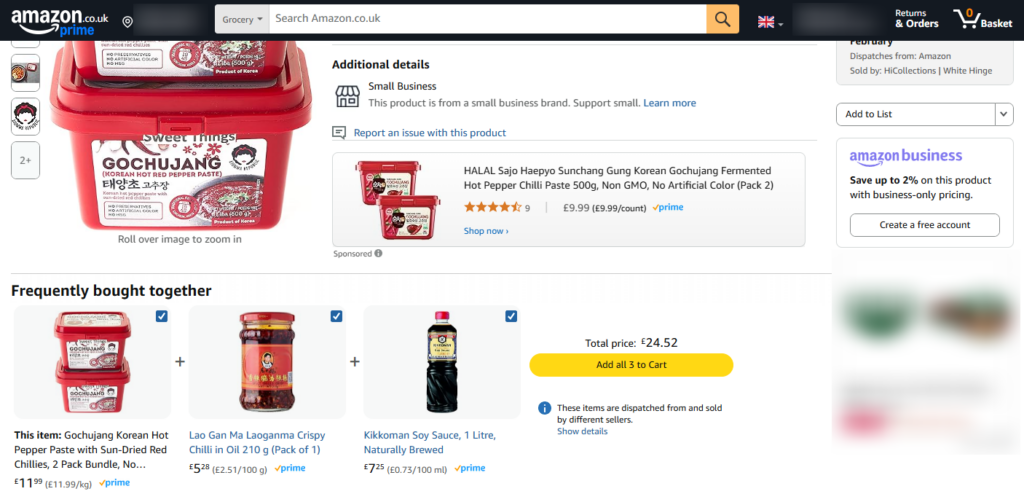
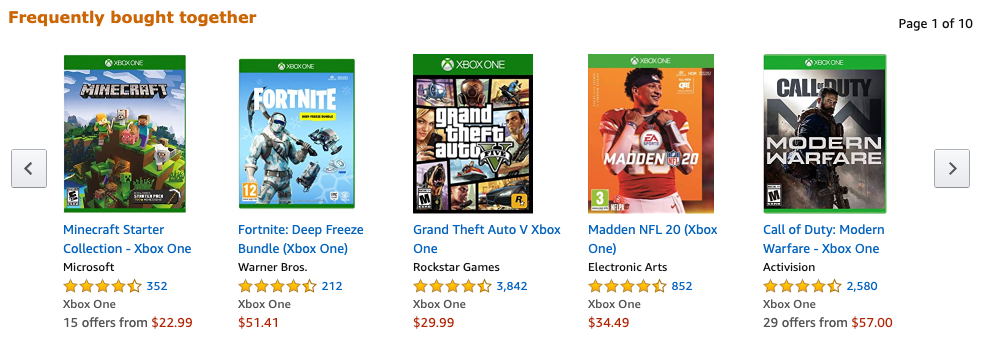
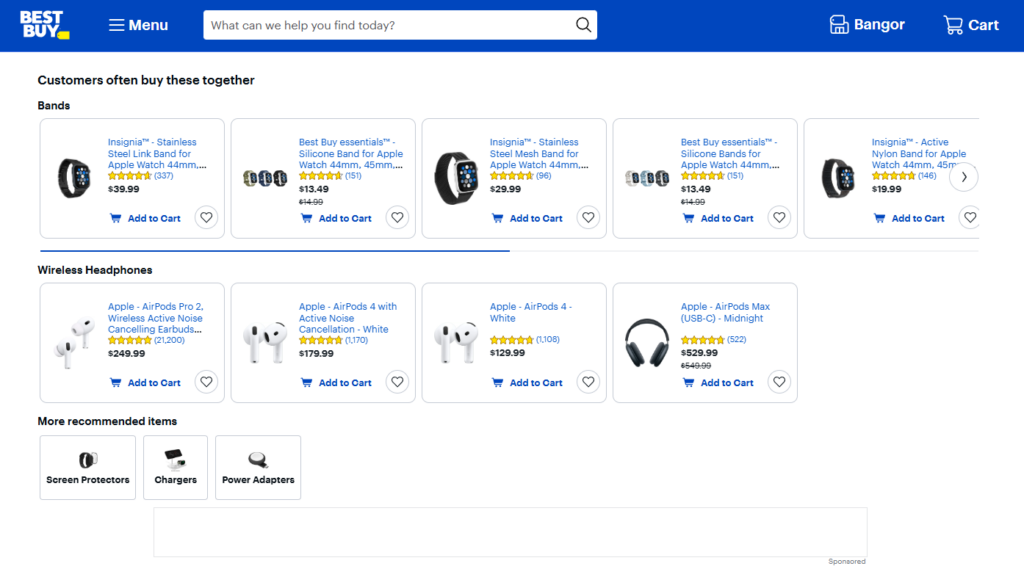
Ever noticed how Amazon suggests items that are ‘frequently bought together’ when you’re shopping? That’s exactly what a frequently bought together section (FBT) does. It recommends related or complementary products right on a product page, making it easy for customers to add more to their cart in just one click.
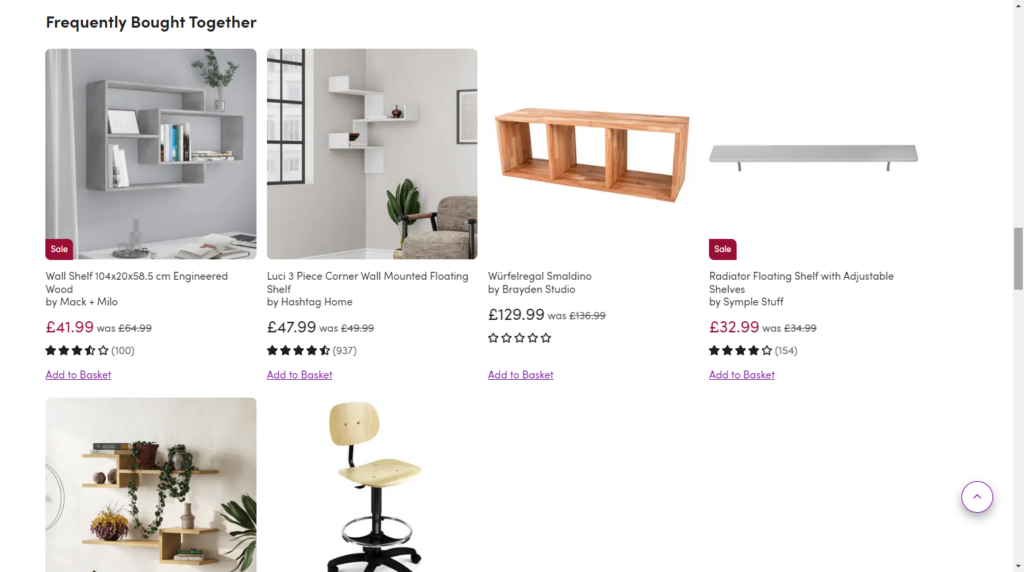
Frequently bought together vs product bundling
A frequently bought together section and product bundles may seem similar, but they serve different purposes in an ecommerce store. A FBT feature suggests related products or complementary products that customers can choose to add to their cart individually. It allows shoppers to customize their purchase by selecting only the additional items they want, often with the option of a small discount. This approach feels more like a helpful recommendation rather than a forced upsell.
Product bundles, on the other hand, group multiple products into a single package with a fixed price. Customers must purchase all the bundled items together, usually at a discounted rate, compared to buying them separately. Bundles work well for pre-packaged deals, such as a skincare set or a gaming console with accessories, while a frequently bought together section gives customers more flexibility to mix and match based on their needs.
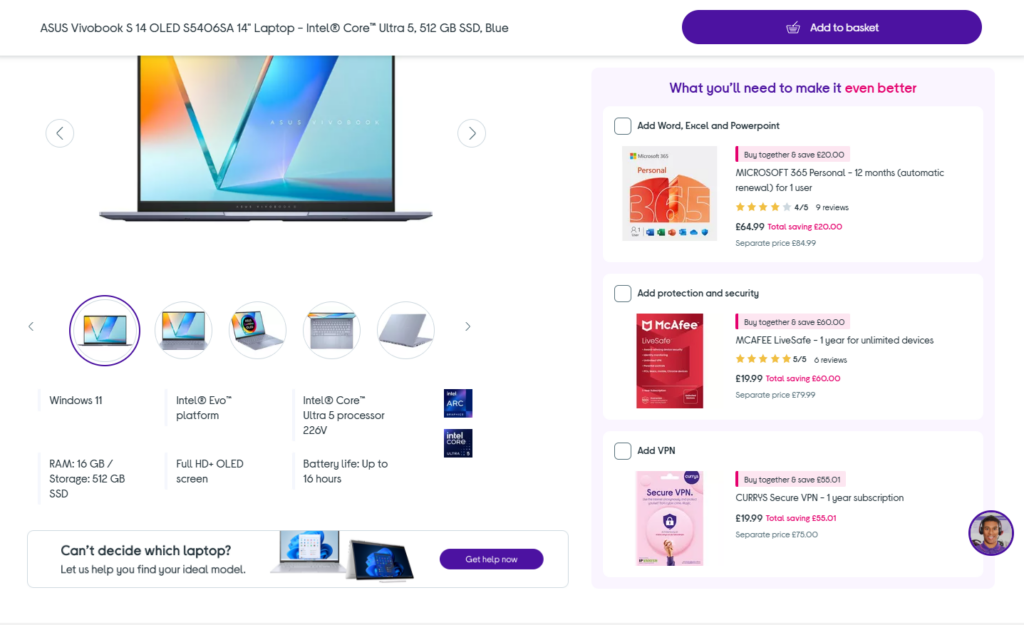
How does it work?
This feature is all about convenience and boosting sales. Instead of making customers search for matching items, it does the work for them.
For example:
- Someone buying a coffee maker might see recommendations for coffee filters, a milk frother, and a bag of specialty coffee.
- A customer looking at a laptop could be shown a protective case, wireless mouse, and external hard drive.
These product pairings can be based on what other shoppers have bought together or on strategic recommendations designed to increase order value.
You’ll find this feature in WooCommerce, Shopify, and other major ecommerce platforms because it’s a proven way to encourage bigger purchases. If you’re using WooCommerce, a plugin like Iconic Sales Booster for WooCommerce makes it super easy to add this feature to your store.
We’ll talk a little more about that later.
The benefits of adding one to your online store
Adding a frequently bought together section to your WooCommerce store is a smart way to increase sales, improve the shopping experience, and boost customer satisfaction. Here’s why it’s worth adding.
Increase your average order value with cross-selling
Think about the last time you ordered at a fast-food restaurant. The cashier probably asked, “Would you like fries with that?” That simple question is an example of cross-selling – encouraging customers to buy complementary products they might not have considered.
A frequently bought together section works the same way. When customers view a product, they’re automatically shown other items that pair well with it. This could be based on customer purchase history or your own recommendations.
For example:
- Someone buying a camera might see suggestions for a memory card and carrying case.
- A shopper looking at a yoga mat could be shown a set of resistance bands and a water bottle.
- A customer purchasing coffee beans might be offered a grinder and a reusable filter.
By making it easy for customers to add these items with a single click, you’ll increase their cart value and improve their shopping experience. Instead of having to search for accessories or complementary products, customers will get a curated selection right on the product page.
A proven strategy used by major ecommerce stores
Amazon has mastered this approach, prominently displaying frequently bought together recommendations on its product pages. It’s no coincidence – this strategy works. By adopting the same tactic in WooCommerce, you can boost sales without relying on pushy promotions or intrusive pop-ups.
Other benefits of frequently bought together recommendations
Beyond increasing sales, there are several other reasons why this feature is beneficial for your online store:
- A better customer experience. Shoppers discover useful products they may not have known about, saving them time and effort.
- Less intrusive than traditional upselling. Unlike pop-ups or aggressive email marketing, frequently bought together sections feel like helpful suggestions rather than sales tactics.
- Builds trust with social proof. When customers see that others have purchased these product combinations, it reassures them that they’re making the right choice.
- Encourages repeat purchases. Customers who find value in your product recommendations are more likely to return for future orders.
Frequently bought together is about enhancing the shopping experience while naturally guiding customers toward products they’ll love. If you’re using WooCommerce, a plugin like Iconic Sales Booster for WooCommerce makes it easy to set up and customize these recommendations, helping you get the most out of this powerful strategy.
How to add a Frequently Bought Together widget to your store
Adding a FBT section to your ecommerce store is a great way to boost sales and improve the customer experience. If you’re using WooCommerce, Iconic Sales Booster for WooCommerce makes it easy to set up and customize product recommendations.
For Shopify users, there are several app options that provide similar functionality.
Adding frequently bought together in WooCommerce with Iconic Sales Booster
Since WooCommerce doesn’t include a built-in frequently bought together feature, the best way to add it is with a WordPress plugin.
Iconic Sales Booster for WooCommerce is a powerful tool that lets you display frequently bought together products directly on your product pages, encouraging customers to add complementary items to their cart with a single click.
In the next section, we’ll walk you through how to do this step-by-step.
Step 1: Install Iconic Sales Booster for WooCommerce
To get started, purchase Iconic Sales Booster for WooCommerce from the Iconic store:
Iconic Sales Booster for WooCommerce
Add cross-selling to your entire WooCommerce store in minutes with Iconic’s WooCommerce cross-sell plugin, Iconic Sales Booster for WooCommerce.
Then follow these steps:
- Go to Plugins > Add New > Upload Plugin.
- Choose the zip file you downloaded, upload it, and then click ‘Activate.’
- Once activated, you’ll need to enter your license key.
Now that we have Iconic Sales Booster installed, we can move on to adding the frequently bought together bundle.
Step 2: Add your frequently bought together products
Once the plugin is installed, you can start assigning frequently bought together products:
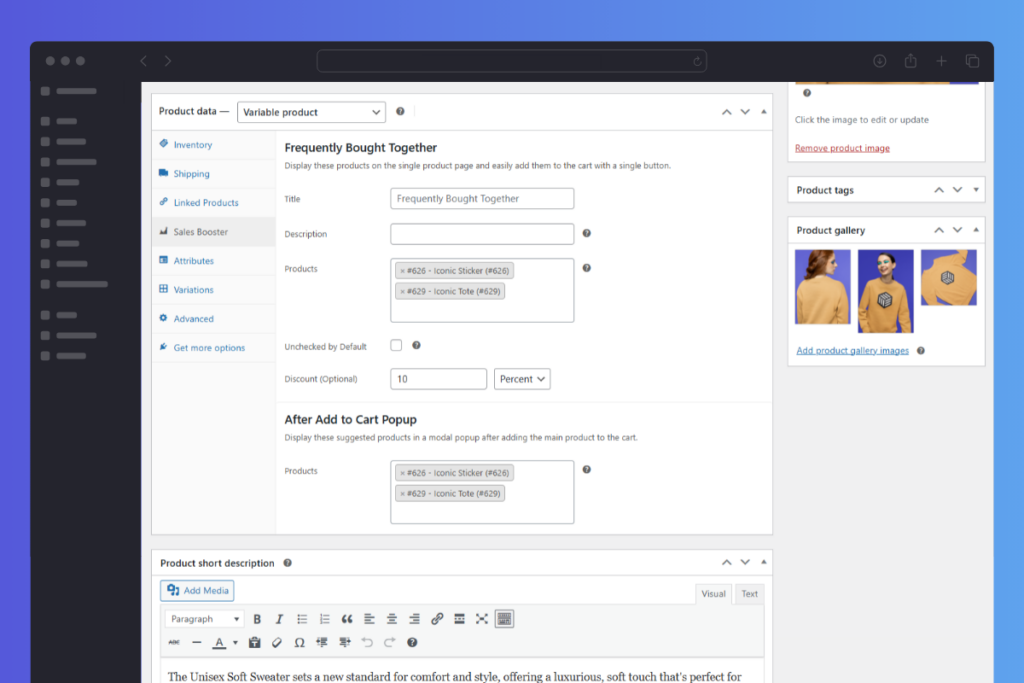
- Go to Products > All Products and select the specific product you want to add cross-sells to.
- Scroll to the Product data section and click the Sales Booster tab.
- Give your frequently bought together widget a name and description to explain the bundle to customers.
- In the Products field, type the name, SKU, or ID of the product(s) you want to add as frequently bought together items.
- (Optional) You can add a discount to the bundle by setting a percentage or a fixed amount off the total cart value.
- Click Update or Publish to save your changes.
Step 3: Customizing the placement of the Frequently Bought Together section
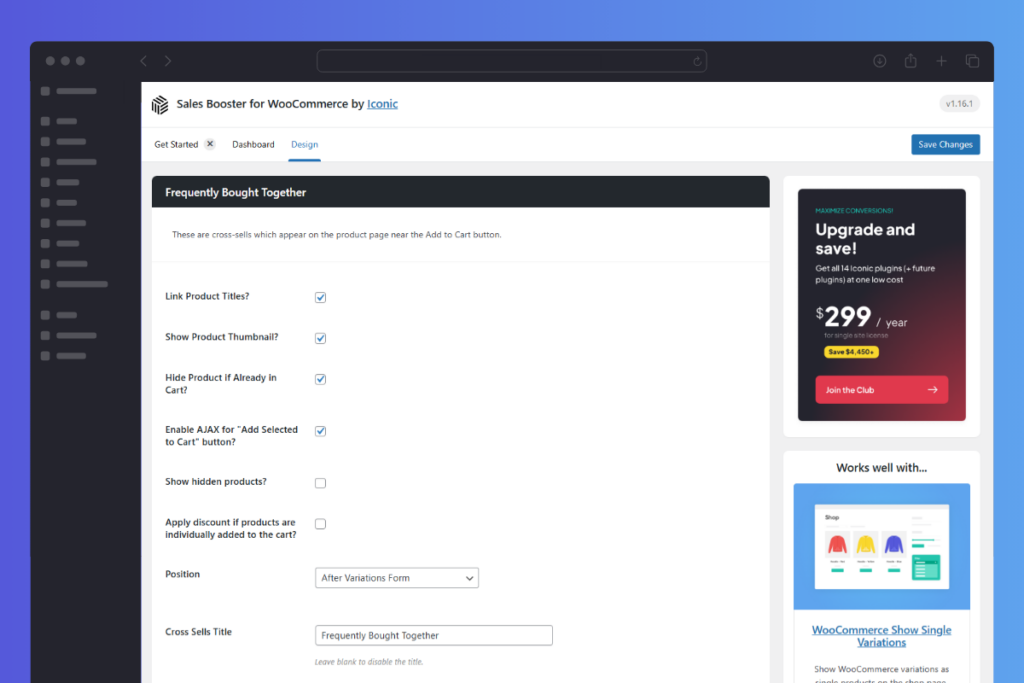
By default, the frequently bought together section appears after the Add to Cart button, but you can choose from 19 different placement options within the Iconic Sales Booster settings.
Some popular placements include:
- Above the product summary. Ideal for making recommendations stand out.
- Below the Add to Cart button. Keeps the upsell in a natural, non-intrusive spot.
If you prefer more control over placement, you can manually position the Frequently Bought Together section using a shortcode.
How to use the shortcode
- In your WordPress dashboard, go to Sales Booster > Settings.
- Click the Design tab and find the Frequently Bought Together section.
- Select the Manually Position with Shortcode option from the Position dropdown menu.
- Copy the generated shortcode.
- Paste the shortcode anywhere you want the section to appear. Such as within a product page template, in a sidebar widget, or even on a landing page.
What the customer sees
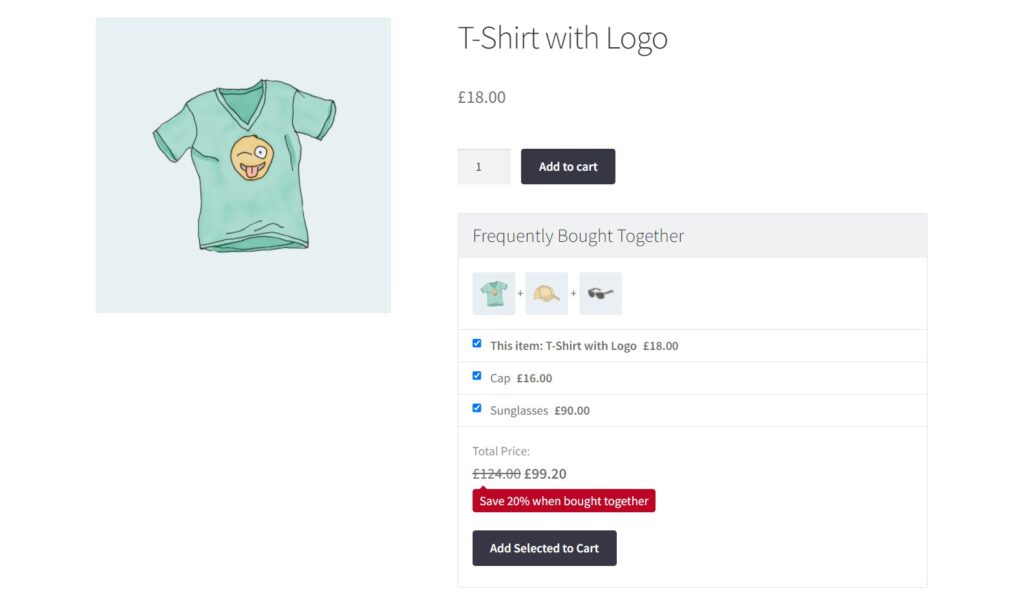
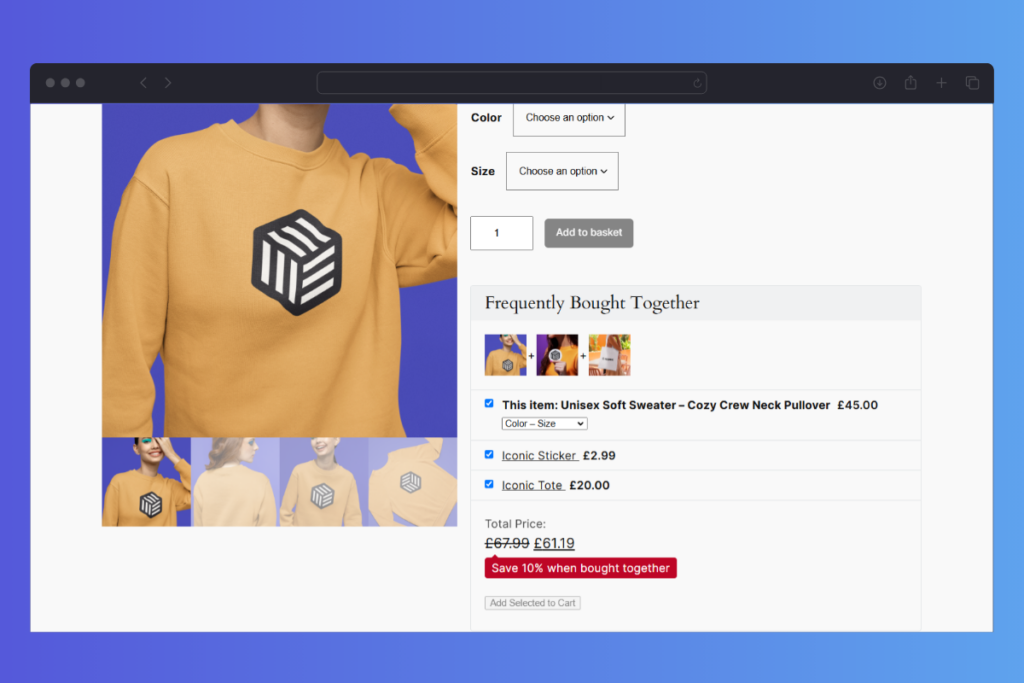
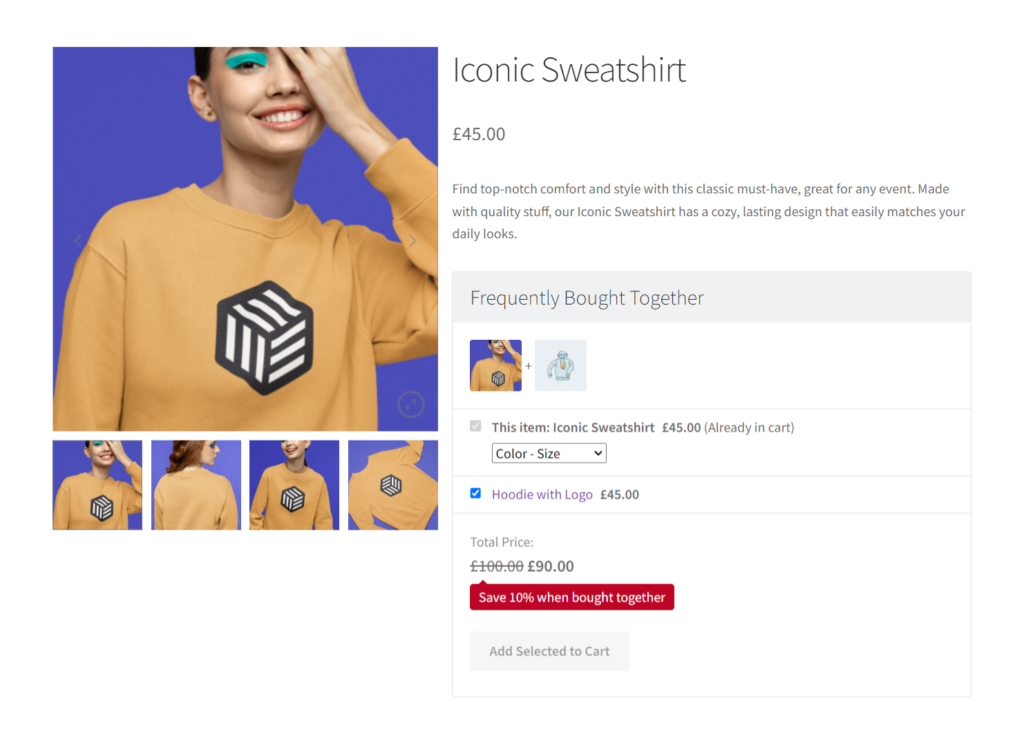
Once saved, a Frequently Bought Together section will appear on the product page, listing the recommended items beneath the main product details. Customers can select checkboxes to add one or more suggested products to their cart with a single click. If a discount is applied, the total price will automatically adjust when all items are added.
Customers will also be able to select product options if one of the products in the bundle is a variable product. They will need to do this before clicking add to cart.
With Iconic Sales Booster for WooCommerce, you can create smart, targeted upsell opportunities that feel natural and useful to customers, leading to higher conversions and revenue.
Adding frequently bought together to your Shopify store
If you’re using Shopify, you can still add a FBT section using third-party apps from the Shopify App Store. Some of the most popular options include:
- Frequently Bought Together by Code Black Belt. One of the top-rated apps that automatically recommends products based on past purchase behavior.
- ReConvert Upsell & Cross Sell. A versatile app that includes frequently bought together recommendations along with other upselling tools.
- SELLY ‑ Promotion & Pricing. Helps create bundled product offers and discounts to encourage larger orders.
Each app allows you to customize recommendations, offer discounts, and track performance to see which products are frequently purchased together.
Tips on making the most of your Frequently Bought Together section
Adding frequently bought together bundles to your store is a great start, but optimizing it can make all the difference. Here are some tips to help you get the most out of this feature and maximize its impact on your sales.
Choose relevant product pairings
The success of your frequently bought together section depends on how well the suggested products complement the main item. Instead of randomly selecting products, focus on logical and useful pairings.
- If you sell electronics, suggest accessories like cases, chargers, or screen protectors.
- In a fashion store, pair a dress with matching shoes or a handbag.
- For food products, bundle complementary flavors or meal ingredients.
The goal is to make shopping easier for your customers and increase their chances of adding more items to their carts.
Offer discounts to encourage larger orders
Everyone loves a deal. Adding a small discount to FBT bundles can make customers more likely to purchase additional products. Even a 5–10% discount or free shipping on bundled items can be enough to convince shoppers to spend more.
If you’re using Iconic Sales Booster for WooCommerce, you can easily set up automatic discounts for bundled products, making it effortless for customers to take advantage of savings.
Keep it simple and easy to use
Your frequently bought together section should be clear, well-organized, and easy to interact with.
Customers should be able to:
- See the recommended products at a glance.
- Quickly add one or all items to their cart with a single click.
- Understand any discounts or offers applied to the bundle.
A cluttered or confusing layout might make shoppers ignore the feature altogether, so keep the design clean and intuitive.

Use data to refine your recommendations
If your store has been operating for some time, use sales data and customer behavior insights to fine-tune your frequently bought-together suggestions.
Look at:
- Which products are often purchased together.
- Customer reviews or feedback that mention complementary items.
- Performance metrics – if certain bundles aren’t selling well, try different pairings.
By continuously testing and adjusting your recommendations, you can increase their effectiveness over time.
Make it mobile-friendly
As more people shop on their phones, your frequently bought-together section should work just as smoothly on mobile devices as it does on desktop.
Ensure that:
- The section is easy to scroll through on smaller screens.
- Buttons are large enough to tap without frustration.
- The layout adapts well across different screen sizes.
A seamless mobile experience means more conversions and happier customers.
Add frequently bought together to your WooCommerce store
A well-optimized frequently bought together section can boost conversion rates, improve customer satisfaction, and enhance the overall shopping experience. By choosing relevant pairings, offering incentives, simplifying the design, using data insights, and prioritizing mobile usability, you’ll make this feature an essential part of your ecommerce strategy.
The WooCommerce plugin Iconic Sales Booster for WooCommerce makes it easy to implement and refine your recommendations. It helps you turn simple product pages into high-converting sales opportunities.
Iconic Sales Booster for WooCommerce
Add cross-selling to your entire WooCommerce store in minutes with Iconic’s WooCommerce cross-sell plugin, Iconic Sales Booster for WooCommerce.

Gina Lucia is our in-house Content Manager at Orderable. She writes articles, user guides, technical documentation, and creates videos on everything WooCommerce and Orderable.
Gina has been working in the WordPress/WooCommerce space since 2012 when she developed WordPress websites for clients large and small.
For the past 8 years, she’s been writing about everything WordPress and WooCommerce, becoming an expert in what makes a WooCommerce store succeed.
When not writing, Gina loves to tend to her vegetable garden, read, or travel to mainland Europe.