
Want to learn about ecommerce optimization strategies to improve your online store’s performance this year? This guide is for you.
But you might not know where to start, what to improve, or if your strategies will work at all. We’re here to help.
In this guide, we’ll walk you through ecommerce optimization strategies backed by real-world data.
Curious to know what we’ll be covering? Here’s a breakdown:
- 8 data-driven ecommerce optimization techniques.
- Why are they important?
- The strategies to implement each of these techniques.
Ready to optimize your ecommerce store for more sales, conversions, and revenue? Here are 8 data-backed optimization strategies to get you there.
8 data-backed ecommerce optimization techniques
As an ecommerce business owner, you’re always on the lookout for techniques that ensure your business performs as well as it can. But, how do you know which ecommerce optimization techniques your customers will actually respond to?
After all, you can’t afford to waste your time and money on unproven tactics that you feel could work. The best way to go about this is to base your ecommerce optimizations on real-world user behavior data, not hunches.
Let’s first look at how to optimize your ecommerce site to boost conversions.
1. Prepare your ecommerce site for international customers
So, you’ve built a successful online store catering to customers in your local country – don’t stop there. A natural next step is to open your business to international customers.
Why this matters
Global ecommerce is growing rapidly. Statista reports that 52% of online shoppers look for and purchase products internationally. So, what does this mean for you as an ecommerce merchant?
Preparing your online store for international customers is a great opportunity to grow your customer base. You can open it up to new customer segments previously unavailable to you.
How to prepare your ecommerce website for international sales
If you want to sell to international customers, you have to make it convenient for them to buy. There are a few things you can do to prepare your online store for this, including:
Enable international shipping
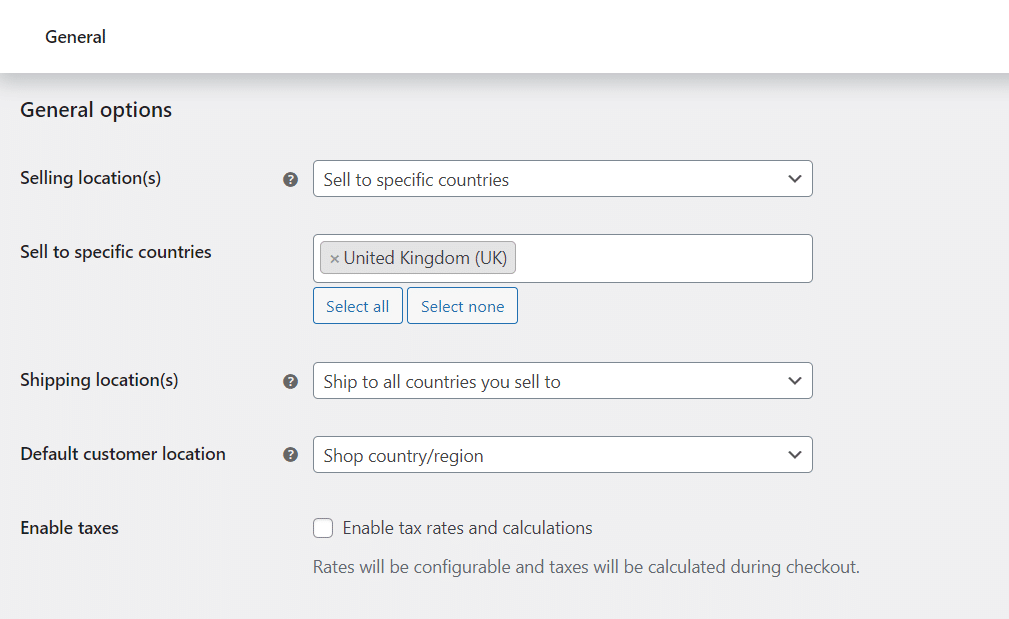
Once you enable international shipping, customers from other countries can buy from you. Without it, you won’t make any sales outside your country, no matter how good your marketing is.
The good news is that enabling international shipping is typically easier than it sounds (in terms of ecommerce settings). In WooCommerce, you’ll select the countries you want to ship to under the General Settings.
Then, under Shipping Settings, you’ll create shipping zones by defining the following information:
- The name of the region you want to ship to.
- The shipping methods. Here, you can charge a flat rate (fixed fee) for shipping to each region or offer free shipping. However, free shipping wouldn’t be advisable since it will eat into your profits.
Finally, for advanced shipping options, consider plugins like Table Rate that allow you to define shipping calculation rules based on weight, cart total, etc.
Add currency switchers
Price is one of the main considerations for customers when they want to purchase. If they can’t see prices in their currency, it will lead to confusion.
To avoid this, you can add a currency switcher to your WooCommerce store with the help of plugins like FOX – Currency Switcher. With a currency switcher, customers can switch your product prices into their country’s currency.
This eliminates confusion over what they’ll need to spend to buy your products.
Create a dedicated shipping info page
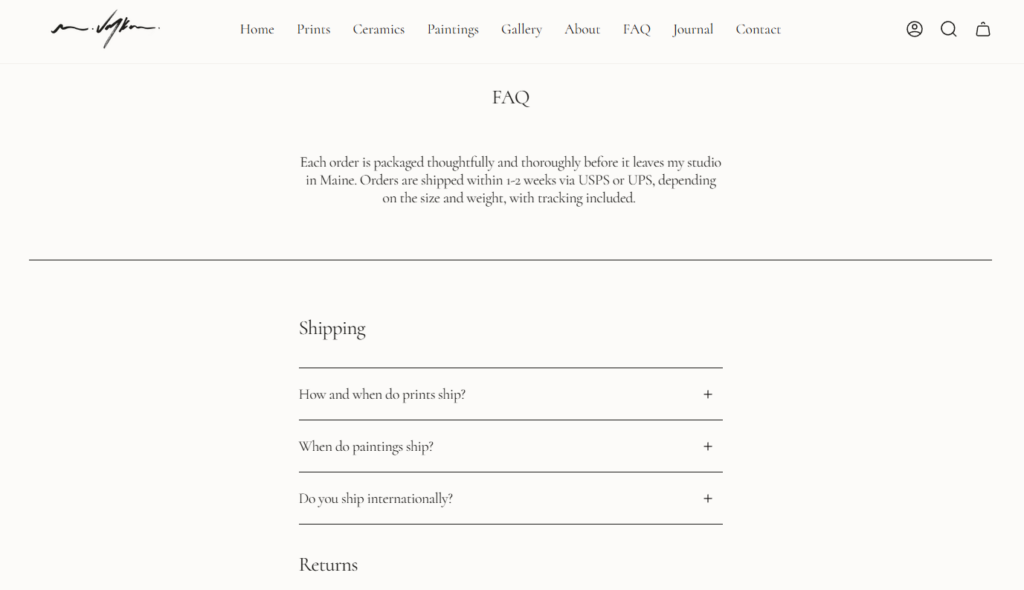
To alleviate worries over shipping delays, hidden fees, customs issues, etc., create a dedicated shipping info page.
On this page, include important information like:
- Shipping options, costs, and delivery times for each region.
- Extra costs such as customs duties and taxes. Specifically, who pays them and how they’re calculated.
- The items you can’t ship to certain regions (if any).
- Returns and exchanges policies for international orders.
By displaying this information, you show customers that your business is transparent, which could go a long way in building trust with them.
2. Use customer reviews to build trust
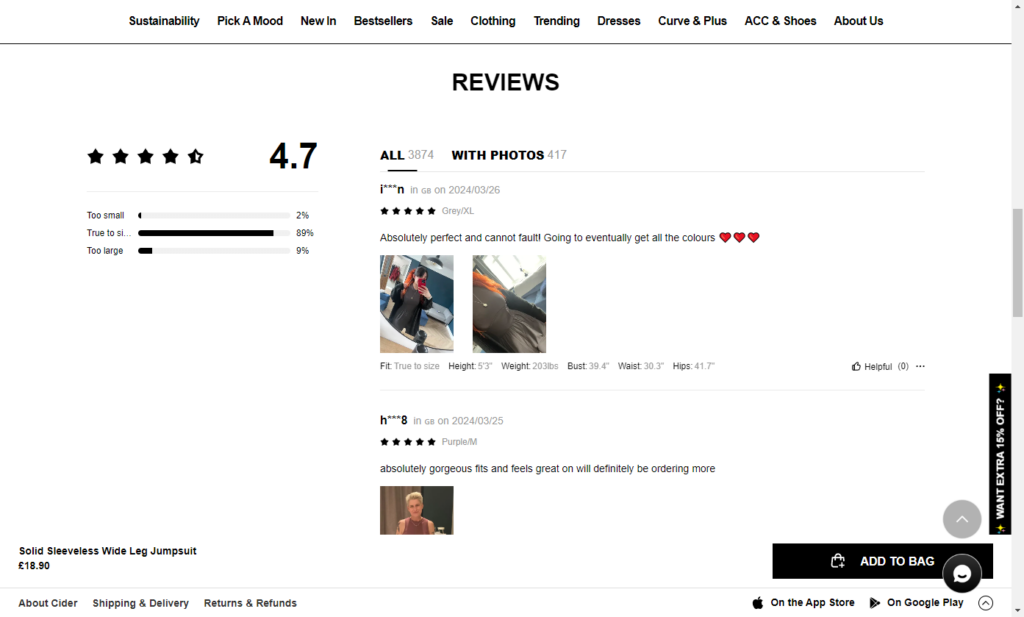
Customer reviews are written or recorded feedback from past customers on their experience with your product or service. They can post these reviews on your website or on third-party review sites such as Zomato.
Why should you include customer reviews in your online store?
According to Search Engine Journal, 99% of customers look for reviews when they shop online.
But why do so many potential customers turn to product reviews? One simple reason: to make them confident in their purchase. Ecommerce customers don’t have the luxury of physically examining your product before they buy.
They rely on others’ experiences to inform their purchase, which is why they look for these reviews.
Including customer reviews is a powerful conversion rate optimization(CRO) tactic
If customers are uncertain about a purchase, tons of good reviews about your product can help get them over the line. Including customer reviews in your online store boosts conversions in this way.
Research shows that ecommerce sites that feature these reviews see a 67% increase in conversions.
How to utilize customer reviews in your online store
First, you have to acquire these reviews. Then, display them on your website where they’ll have the most impact on potential customers’ buying decisions.
Encourage customers to leave reviews
Customers rarely leave reviews if you don’t ask for them. So the first step would be to explicitly ask customers to leave reviews after a purchase.
Of course, with products, you have to give customers time to use your product before asking them for a review. With the help of plugins like Customer Reviews for WooCommerce, you don’t have to do this manually. You can automate review requests, for example, 2 weeks after a customer buys a product.
Leverage off-site reviews
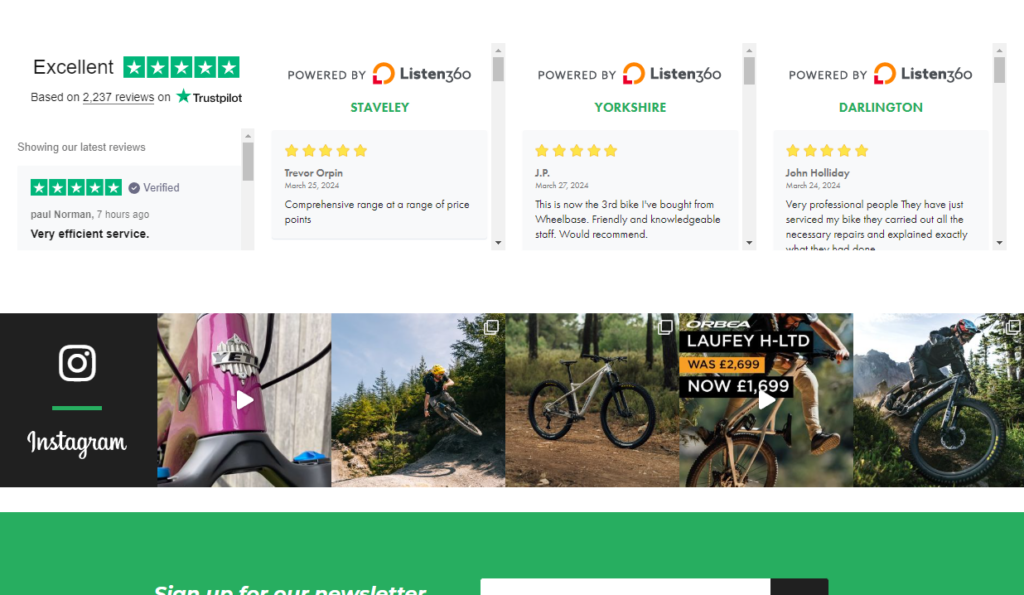
Set up accounts for your ecommerce business on popular review platforms such as Google Reviews, Trustpilot, and Yelp. Remember that before customers decide to do business with your brand, they do research outside your store online.
When they want to find out if your brand is legit or if your products are high-quality, these are the sites that will pop up in their research. If you have positive reviews on these sites, you’ll convert more customers.
Gather and display your reviews
After getting reviews from your customers, ensure you display them on the product page. Customers can refer to them as they make their purchasing decisions.
What about your off-site reviews? If you have reviews on multiple platforms, use the WP Business Reviews plugin to gather them and display them on the customer testimonials section.
Want to learn how to get better customer reviews? Check out our Ecommerce Customer Reviews guide for a detailed walkthrough.
3. Reduce cart abandonment
Cart abandonment is when customers add products to their shopping carts, but they don’t complete the purchase. It is one of the biggest challenges for ecommerce stores. Why? Because abandoned carts are lost sales. Which is why it’s so important for ecommerce optimization.
Why should you focus on reducing cart abandonment?
According to Statista, the cart abandonment rate sits at a staggering 70%. In all fairness, a good chunk of this comes from customers simply window shopping or comparing prices with your competitors.
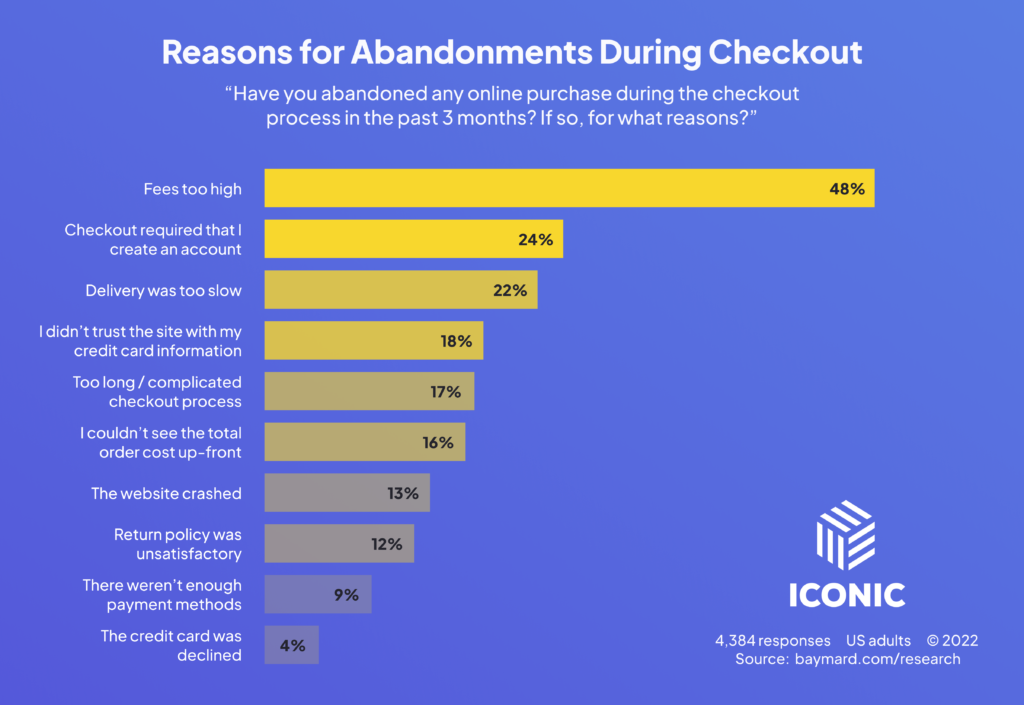
But, it is important to note that this isn’t the only reason. So, you should focus on reducing cart abandonment because doing so directly increases your sales and revenue. If fewer customers abandon their carts, more of them complete purchases. Simple as that.
How to reduce cart abandonment
Customers can abandon their carts for several reasons, making reducing cart abandonment a tricky problem to solve. So, try to understand why website visitors abandon their carts and then address these reasons.
To guide your research, you can ask yourself:
- Is customer experience up to scratch, from the landing page and homepage to the checkout?
- Do I have enough payment options enabled?
- Are there any checkout surprises, such as unexpected costs?
For what it’s worth, most customers drop off at the checkout page. So this is what you should optimize first.
Streamline your checkout process with Flux Checkout for WooCommerce
With the WooCommerce plugin Flux Checkout for WooCommerce, you can make your checkout flow user-friendly, fast, and distraction-free. This goes a long way to boost your conversions and reduce your cart abandonment rate.
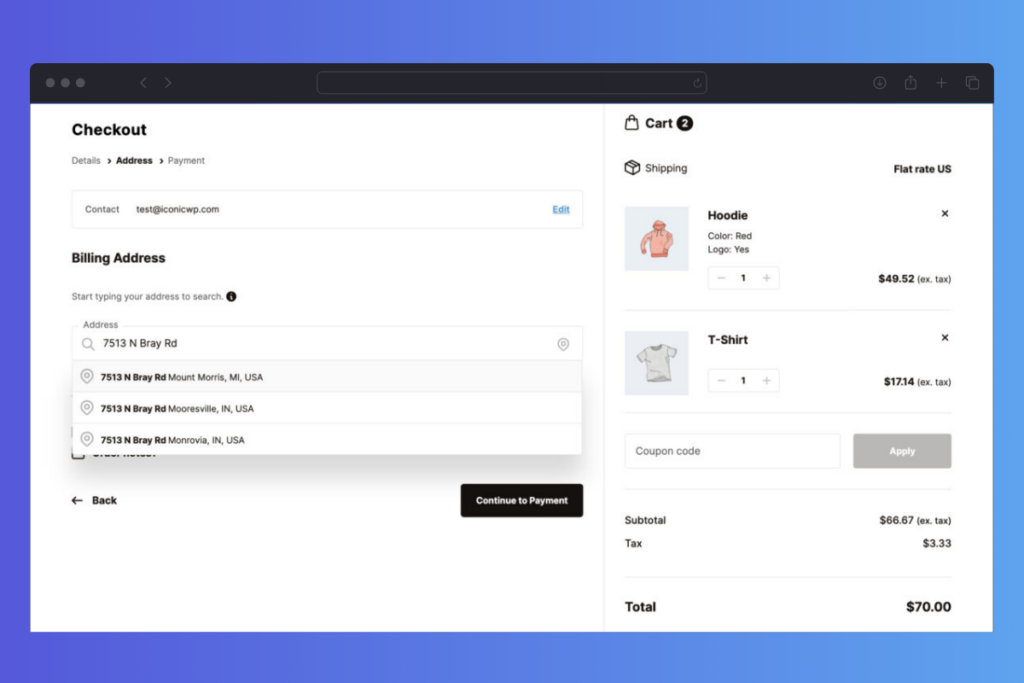
Once you install it, you can use it to upgrade your checkout in the following ways:
- A default multi-step checkout flow. Flux Checkout takes customers through separate checkout steps (order details, shipping address, etc.), which is more manageable.
- Minimum distractions as customers check out. Unnecessary fields, headers, and footers are hidden so that customers can focus on checking out.
- Address autocompletion. Customers don’t have to fill out all address fields. They only have to start, and Flux will do the rest.
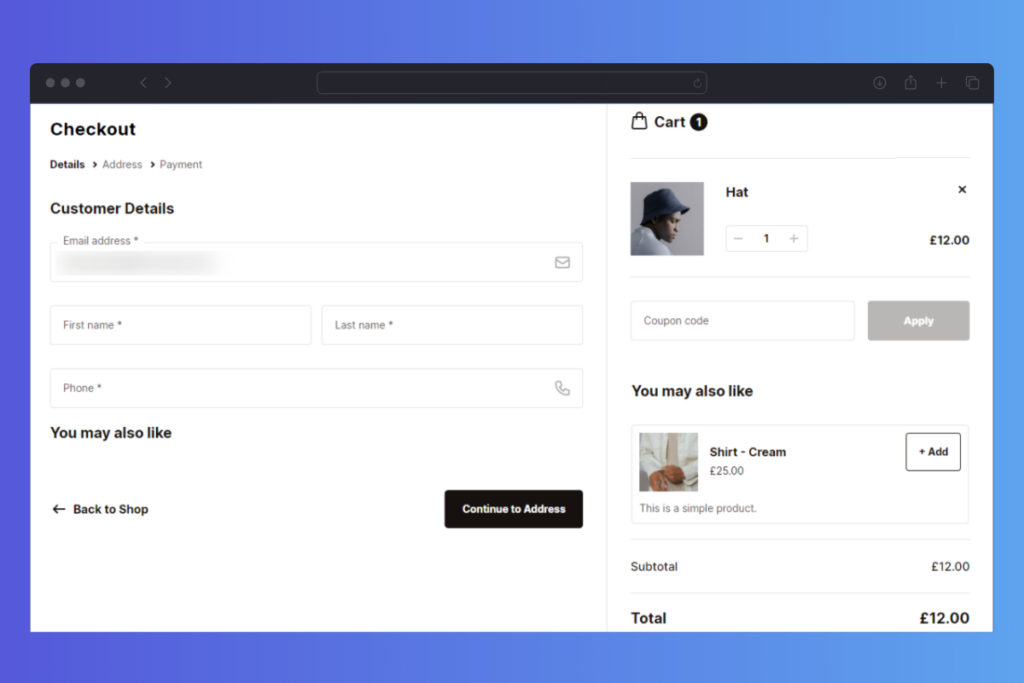
Apart from simplifying the checkout, Flux Checkout also enables you to cross-sell on your checkout page. You can include useful product recommendations here to save your customers a trip back to the shop page.
You can upsell related products or best sellers here. When customers add them to their purchase, your average order value goes up.
Flux Checkout for WooCommerce
Flux Checkout transforms the default WooCommerce checkout into one that’s lightning-fast, distraction-free, and reduces checkout abandonment.
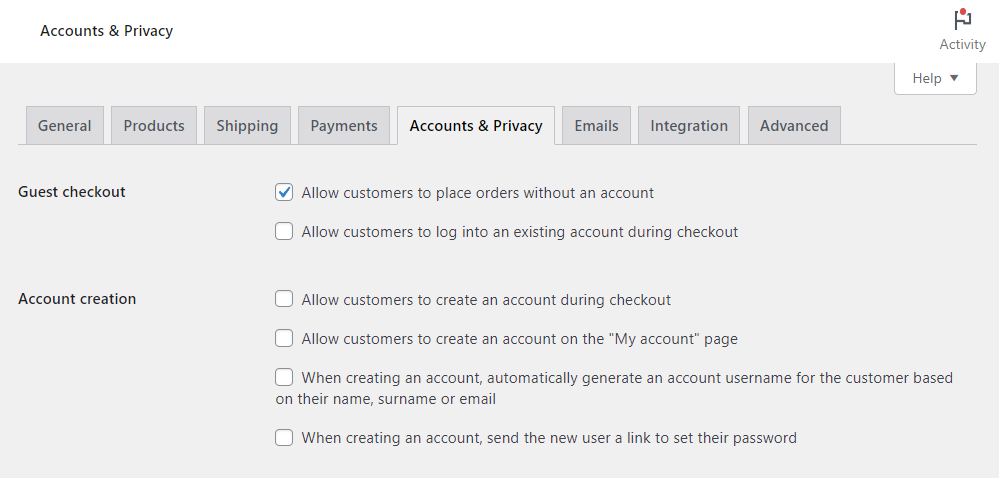
Enable a guest checkout option
Not all customers who buy from you want to create an account before completing their purchase. So forcing them to do so will only drive them away.
Cart abandonment studies show that 19% of customers will abandon their carts when they’re forced to create an account.
To prevent this, enable a guest checkout option. With this option, customers can conveniently check out without having to create an account.
Offer multiple payment options
Include popular mobile payment methods such as Amazon Pay, PayPal, Alipay, and credit cards. When you do, customers can pay using their preferred payment method.

Use abandoned cart recovery emails
Using abandoned cart recovery emails, you can persuade some cart abandoners to come back and complete their purchase. These emails remind customers to complete their purchases, usually 2 – 4 hours after they abandon their cart.
One survey found that businesses using them earn back about 3% of lost sales. So this is something you’ll want to look into to reduce abandoned carts.
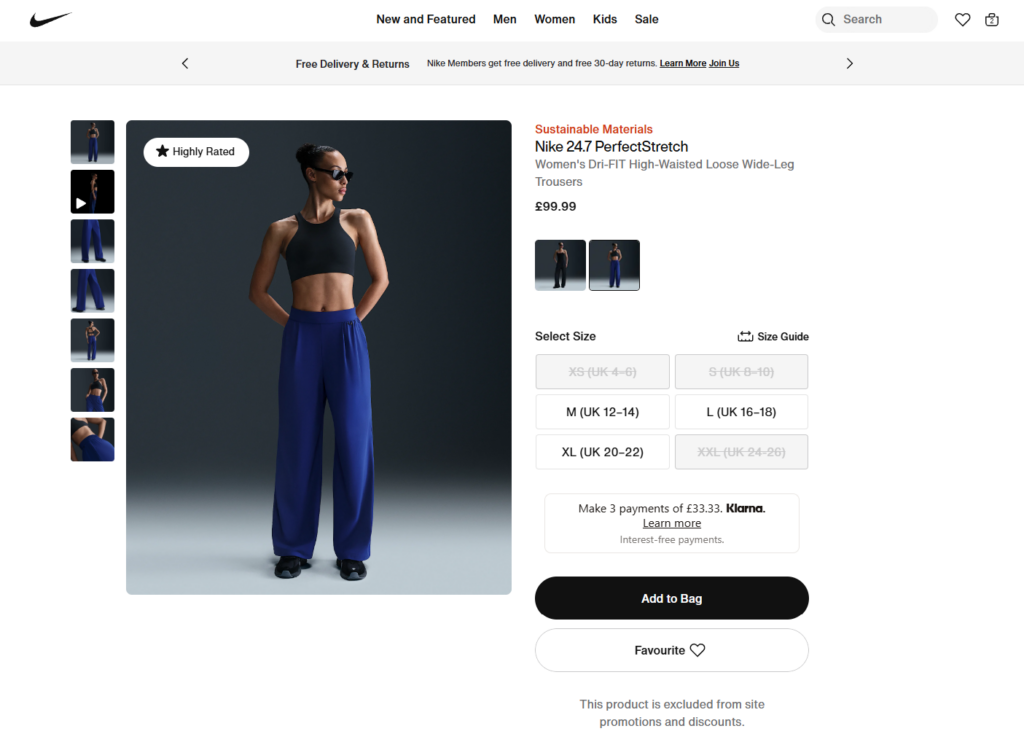
4. Make product pages information-rich and optimized for research
Customers often conduct thorough research before making a buying decision. They’ll go through your product page looking at feature lists, descriptions, and prices (of course).
They also like to compare different products to see which one would be a better fit for them. As such, you must ensure your product pages do a great job of convincing them to buy by including all the information they might need.
Why you should make your product page information-rich
Let’s look at some numbers to understand just how important having an information-rich product page is.
- 81% of online shoppers conduct research before buying (Invoca).
- 65% of shoppers look up price comparisons on mobile while in-store (SalesLion).
Given that they do most of this research on the product page, it must have the information they need to make a purchasing decision.

How to create effective product pages
An effective product page should answer key questions, address concerns, and help potential customers decide if your product is a good fit for them. With that in mind, here’s how you should optimize your product page.
Include comprehensive product descriptions
How much detail you go into with your product description depends on the product itself. When the product is self-explanatory, let’s say a white T-shirt, there’s little need to explain what it is or who it’s for.
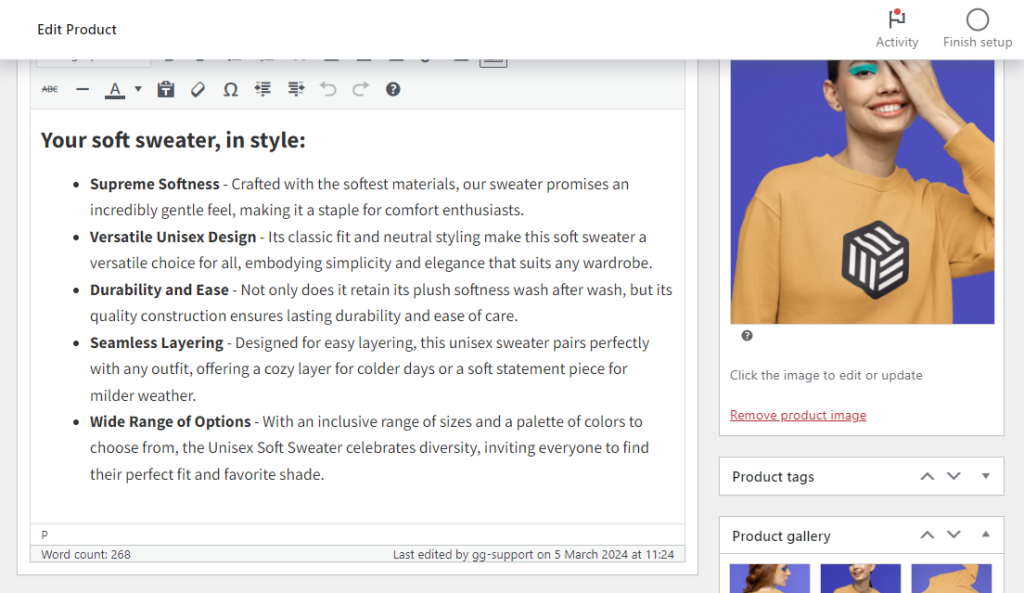
But for technical products like electronics, you’ll need to describe the components and how they benefit customers. So, what makes a good product description?
- Focusing on benefits, not just features. For instance, ‘Soft fabric that feels great on your skin’, instead of just ‘100% cotton’.
- Simple scannable language. To allow customers to skim through the description and still understand what your product is all about.
- Include keywords for search engines. Once you’ve done keyword research, spread them out in your product descriptions. This will improve your SEO ranking and bring in organic traffic.
Work on your product gallery
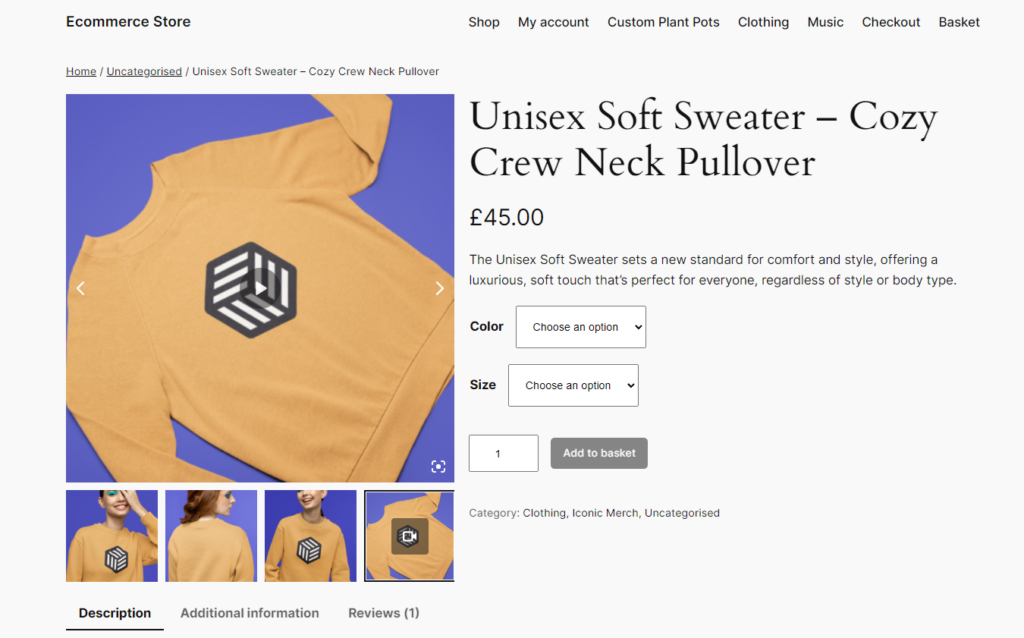
Some product features are much easier (for example, texture) or only possible to explain visually through product images and videos. Ensure your product gallery is filled with high-quality images and videos of your products.
Ideally, the images should be taken from various angles to give potential customers a complete view of the product. Each variation should also have its own set of images.
Modcloth does this so well. They have people model different dress sizes to help customers determine whether the dresses would look good on them.
After gathering product videos, improve their presentation on your product gallery with the WooCommerce plugin WooThumbs for WooCommerce.
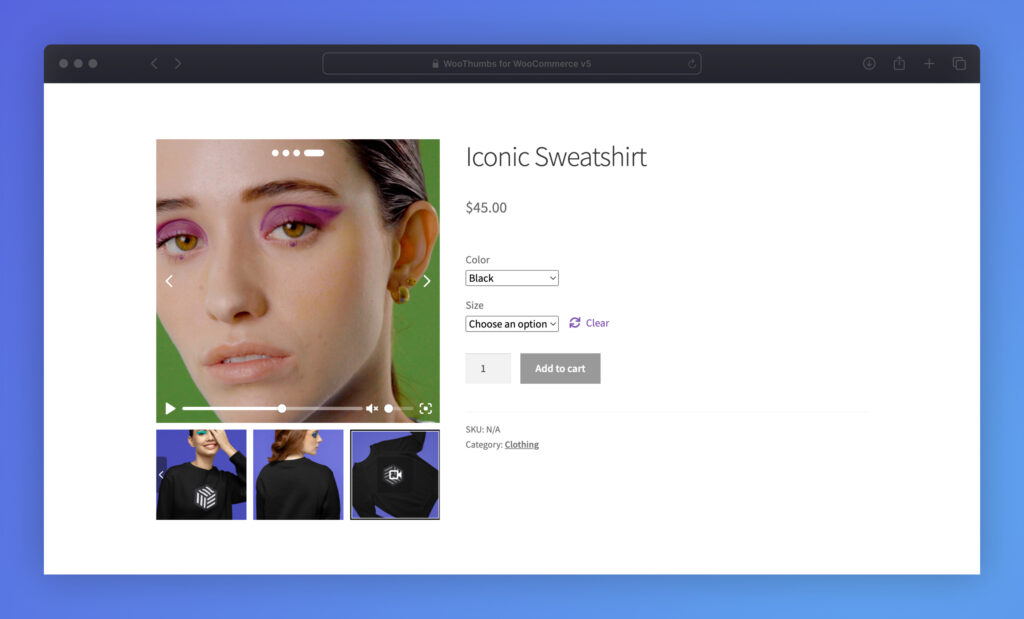
Upgrade your WooCommerce product gallery with WooThumbs for WooCommerce
WooThumbs for WooCommerce upgrades the default product gallery to make it more effective in driving conversions. It makes your WooCommerce product gallery completely customizable.
You can transform it with a new design and features, allowing your customers to browse through your product media.
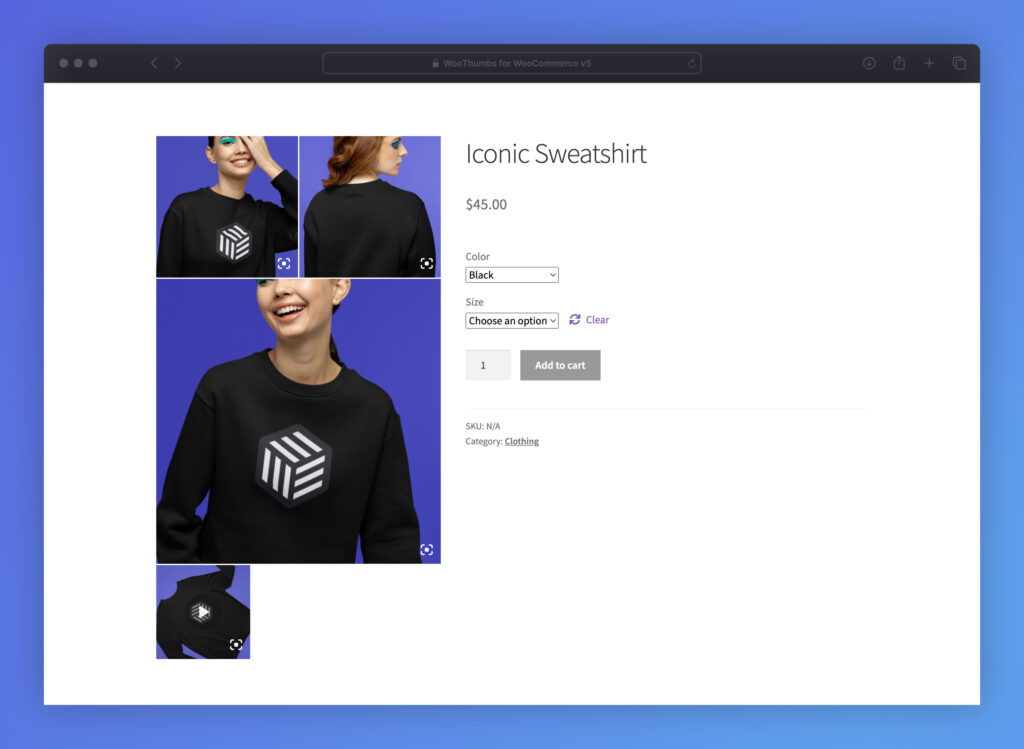
Regarding improving your product gallery’s design, you can:
- Pick the layout you want. This includes a modern stacked or carousel layout.
- Add different transitions, zoom options, slider autoplay options, etc.
To give customers enough information about your product, you can add different images per variation and a product video. You can host the video on your WordPress website or elsewhere, like YouTube.
That’s not all you can do to optimize your product page. We’ve covered more tips in our How to Create Better Product Page Content guide.
WooThumbs for WooCommerce
Customize your WooCommerce product image gallery in minutes with a new layout, embedded video, multiple images per variation, and more.
5. Optimize your online store for mobile devices
Mobile optimization means your website’s design looks and functions seamlessly on mobile devices. This is one ecommerce optimization tactic you can’t skip. Here’s why.
Why mobile ecommerce optimization matters
Mobile ecommerce sales have been growing dramatically. In fact:
- Mobile devices have a better conversion rate than desktops (Statista).
- Mobile commerce studies project that mobile commerce will be responsible for 59% of total retail ecommerce sales (Sellers Commerce).
There’s no better time to take advantage of this growth and optimize your ecommerce site for mobile users.
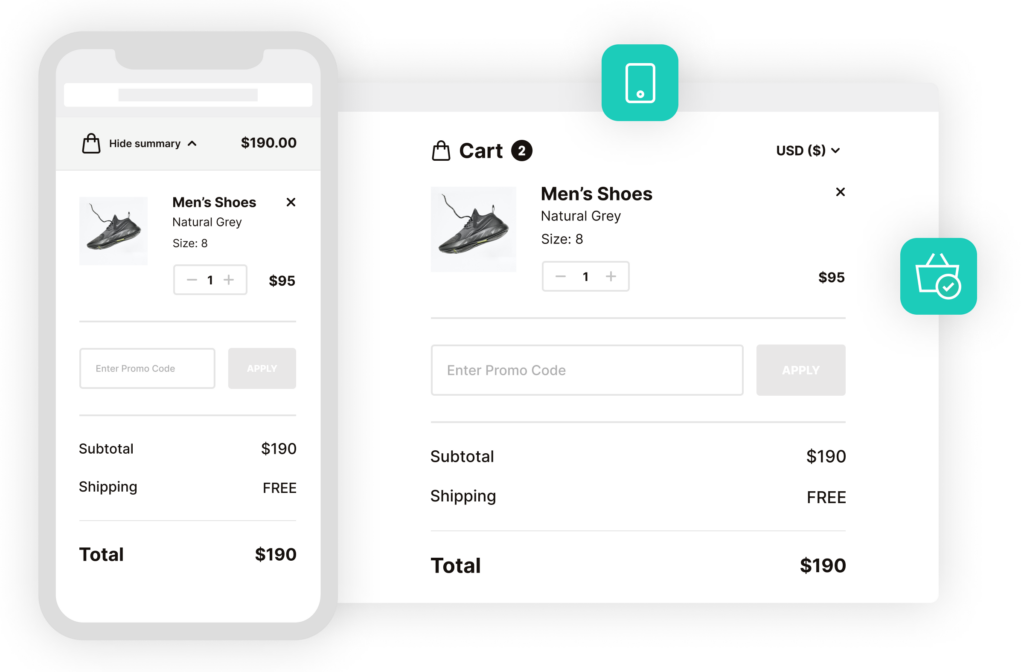
How to optimize your online store for mobile devices
Luckily, with WooCommerce, you won’t have to do much. Popular themes such as Astra and Kadence Starter Templates are built to be mobile responsive. Once you install them, your site will automatically adapt to the user’s screen.
You’ll need to go a step further and use your page builder to add mobile-friendly elements such as hamburger menus.
Also, remember that page load time plays a part in improving user experience on mobile. As such, implement performance ecommerce optimization techniques such as image compression, lazy loading, etc.
WordPress performance plugins like WP-Optimize will help you get this done.
6. Build a social media presence
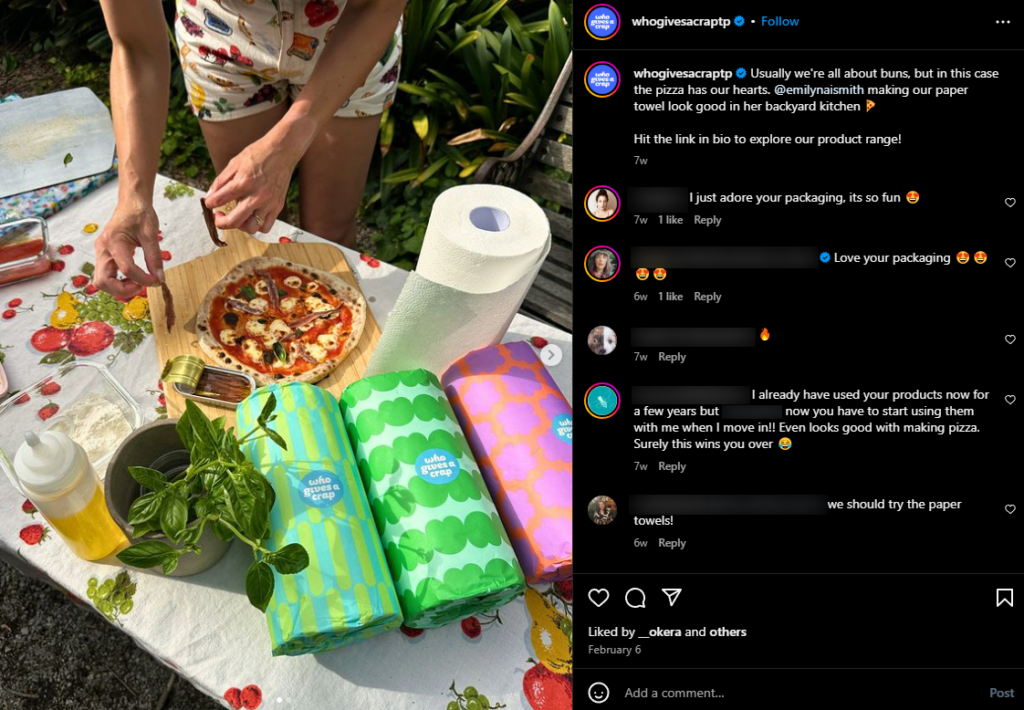
Social media is a big part of the marketing strategy for most online businesses today. We can’t emphasize enough how important having a strong social media presence is. To reach more customers easily, you must build a social media presence.
Why building a social media presence is worth it
Millions of potential customers spend hours scrolling on social media platforms each day, with some of them looking for products to buy. By putting your business out there, you can reach out to them.
But, how effective is this? According to Sales Lion, online sales with a social presence see an average of 32% more sales.
This means that you can sell to more customers when you have a strong social media presence.

How to build a strong social media presence
Ideally, you want to create social media accounts to increase your reach. We recommend starting with the platforms on which your target audience hangs out.
For example:
- Instagram and Facebook – for fashion, lifestyle, and home goods.
- TikTok – all types of products, including trendy products.
- Pinterest – home decor and DIY products.
Don’t forget about X (Twitter), it is an excellent platform for engaging with customers. When creating your accounts, use a business profile and add links to your store using tools like Linktree.
After creating your accounts, do the following to establish your brand.

Be active on social media
Post updates regularly and engage with followers to grow your following. You can post best sellers, trending products, or customer favorites on reels, stories, or typical posts. If you get any comments, thank users for their feedback and address concerns, if any.
Also, keep an eye on trends and jump on those that relate to your business.
Grow your audience with paid advertising
Major social media platforms allow you to pay for ads and run promoted posts. With promoted posts, you can target a wider audience or, more specific audience as opposed to relying solely on hashtags.
Collaborate with influencers
If you want to grow your following and look credible in their eyes, partner with influencers. These are people with large, dedicated followings. Their followers take their recommendations seriously.
If they recommend your business, more people will start engaging with it. To find influencers in your industry, use influencer marketing platforms like Modash.
After building a strong social media presence, you can now implement a social commerce strategy.

7. Implement a social commerce strategy
Social commerce refers to using social media to sell directly to customers. Customers discover a product they like from your posts, click on it, and purchase it without leaving the social media platform.
Why should you have a social commerce strategy in place?
First, social media presents you with substantial selling opportunities. With a social commerce strategy, you can take advantage of the millions of customers who scroll through social media looking for products to buy.
Secondly, major social media platforms have evolved to support social media selling. Instagram and TikTok are great examples. These two have shop versions of themselves (TikTok Shop and Instagram Shop). You can create and run a makeshift online store on these platforms.
Because of these two reasons, more ecommerce merchants are getting into social commerce. Statista projects that social commerce will be worth $2.9 trillion by 2026.
As someone looking to optimize their ecommerce business, you should also implement a social commerce strategy.
How to implement a social commerce strategy
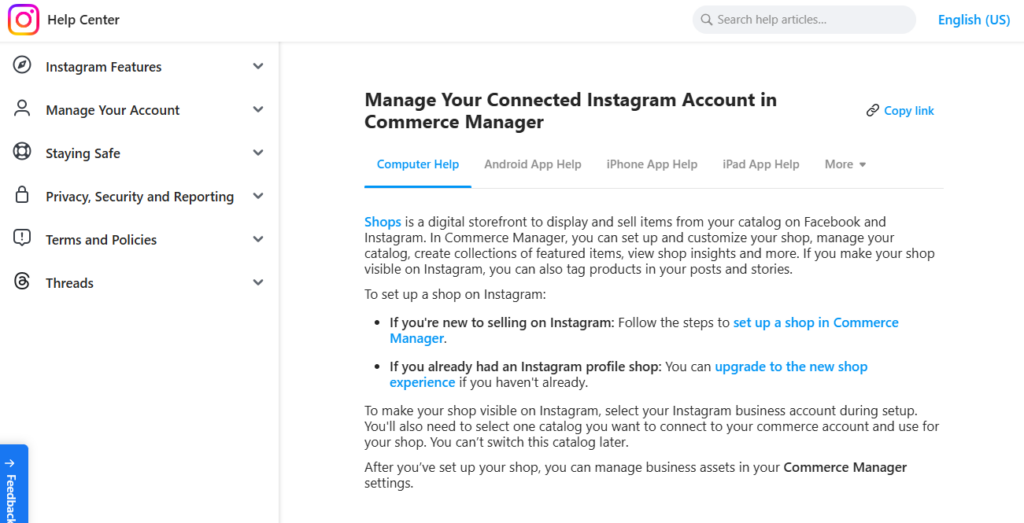
You can implement a social commerce strategy by using your social media accounts as additional sales channels. Instagram and TikTok make it easy for you to do this with shoppable posts.
Create shoppable posts
TikTok and Instagram shops were created to cut down the steps that separate your customers from a product once they discover it on social media. First, you’ll need to set up a shop on these platforms.
They have different solutions for this:
- Commerce Center for Facebook and Instagram.
- Seller Center for TikTok.
After creating a shop, you can then create shoppable posts. These are like normal video/image posts but with a clickable call-to-action (CTA) shop icon attached to them. Once a customer clicks the shop icon, they can browse the product’s description.
They’ll then choose to check out on the social media platform or complete the process on your ecommerce site.
Use TikTok and Instagram to showcase additional content
You don’t have to limit yourself to product posts. You can also post engaging content such as:
- Behind-the-scenes videos on how your product is manufactured.
- How customers can care for your product. This is useful if you’re selling things like leather bags.
- Videos of customers using your products.
That aside, you could also create a livestream of any type of content and link your products for customers to buy. The possibilities are endless.

8. Boost sales with social proof
New customers who don’t know your brand yet are naturally skeptical. They need extra reassurance to buy from you, even if you have a high-quality product and have presented it well.
This is where social proof comes in. You use other people to influence hesitant customers to make a buying decision. You show them that many other customers have bought your product and had a great experience with it, to make new customers confident in their purchase.
Why social proof matters
Social proof is crucial in online shopping because it can help boost sales. Several studies back this.
- A study by ConversionXL found that adding customer reviews to an ecommerce site can increase sales by 18%.
- Spiegel Research Center reports that displaying reviews can increase conversion rates by up to 270%.
Given that social proof can directly lead to more sales, adding it to your online store is a no-brainer.
How to use social proof in your online store
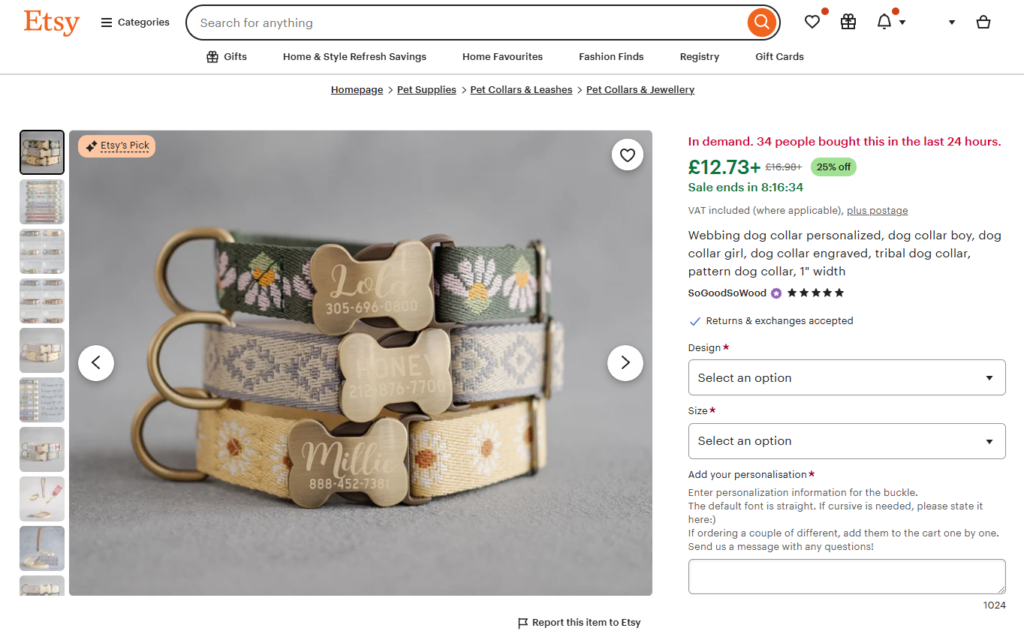
One of the most powerful forms of social proof you can add to your online store is customer reviews. We’ve already covered their importance and how to add them.
So, apart from customer reviews, here are other forms of social proof that can be useful in getting you more sales:
- Testimonials. These are statements made by satisfied customers, highlighting their experience with your product or service. They are great for building trust because they are based on personal experiences.
- Case studies. These dive into the specific times your product helped solve your customer’s problem.
- Customer-generated content. For instance, unboxing videos or videos of your customers using your product.
Ensure you place your social proof where it will have the most impact. For example, reviews should be on the product page, while testimonials and case studies should have a dedicated section in your online store.
These are not the only types of social proof you can use. We’ve covered many more in detail in our How to Add Social Proof to Ecommerce guide.
Optimize your ecommerce store today
Ecommerce optimization is the key to getting more sales and growing your customer base. There are so many aspects of your ecommerce store you can optimize.
Knowing what to optimize and how to go about it, and whether it will work at all, is a challenge in itself. In this guide, we’ve covered 8 of the best ecommerce optimization strategies, backed by data on how effective they are.
We’ve included the strategies and tools to help you get them done. Tools such as:
- Flux Checkout for WooCommerce – To improve your checkout flow for better conversions.
- WooThumbs for WooCommerce – To upgrade your product gallery and improve how you present products to your customers.
You can use these strategies to power your next ecommerce optimization process. So, improve your ecommerce store’s sales, conversions, and revenue today with these data-backed optimization strategies.

Gina Lucia is our in-house Content Manager at Orderable. She writes articles, user guides, technical documentation, and creates videos on everything WooCommerce and Orderable.
Gina has been working in the WordPress/WooCommerce space since 2012 when she developed WordPress websites for clients large and small.
For the past 8 years, she’s been writing about everything WordPress and WooCommerce, becoming an expert in what makes a WooCommerce store succeed.
When not writing, Gina loves to tend to her vegetable garden, read, or travel to mainland Europe.