
How to Hide The Parent Product
If you’re using Show Single Variations to display your product variations as single products, you might want to hide the parent variable product to make things less confusing for your customers.
If so, you can hide each individual parent product by taking the following steps:
- In your WordPress dashboard, go to Products > All Products and select the variable product you want to edit.
- At the top right of the edit product page, you’ll find the Publish section.
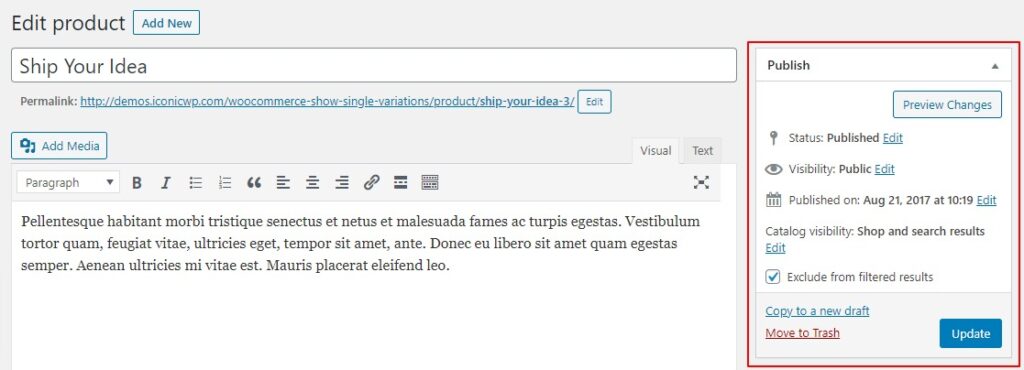
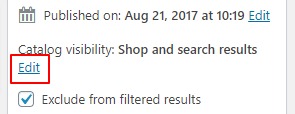
- Click the blue Edit text next to Catalog visibility: Shop and search result, this will bring up a few options.
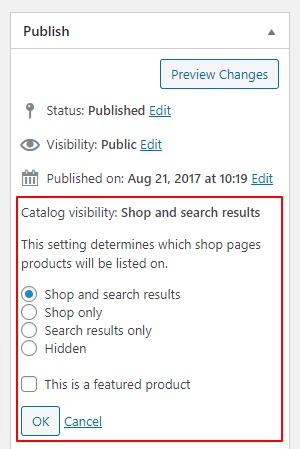
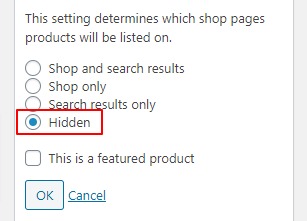
- Select the radio button/checkbox next to Hidden and then click the grey OK button.
- Then click the blue Update button in the Publish section that you’re in.
- Your variable parent product will now be hidden from the catalog. However, it still will be visible as a single product page.
WooCommerce Show Single Variations
Show WooCommerce variations as single products on the shop page, category pages, search results, and filtered results with WooCommerce Show Single Variations.
Was this helpful?
Please let us know if this article was useful. It is the best way to ensure our documentation is as helpful as possible.