
How to Change the ASAP Delivery Fee by Shipping Method
If you’re looking to adapt the ASAP delivery fee in WooCommerce Delivery Slots depending on the shipping method the customer selects, this guide will help.
In WooCommerce Delivery Slots, the “ASAP” delivery option can have a fee associated with it. By default, this fee is the same across all shipping methods. However, you may want to set a different ASAP fee depending on the selected shipping method (for example, higher for express shipping and lower for free shipping).
To achieve this, use the following snippet:
<?php
/**
 * Iconic WDS - Change ASAP timeslot fee for shipping method.
 *
 * @param array $timeslots The timeslots.
 * @return array The modified timeslots.
 */
function iconic_wds_change_asap_timeslot_fee_for_shipping_method( $timeslots ) {
	global $iconic_wds;

	// Todo modify the Shipping method ASAP rates
	$asap_rates = array(
		'free_shipping:1' => 5,
		'flat_rate:5' => 6,
	);

	$chosen_shipping_method = $iconic_wds->get_chosen_shipping_method();

	if ( isset( $asap_rates[ $chosen_shipping_method ] ) ) {
		$timeslots['asap']['fee'] = array(
			'value' => $asap_rates[ $chosen_shipping_method ],
			'formatted' => wc_price( $asap_rates[ $chosen_shipping_method ] ),
		);

		$timeslots['asap']['formatted_with_fee'] = $timeslots['asap']['fee']['value'] > 0 ? sprintf( '%s (+%s)', $timeslots['asap']['formatted'], wp_strip_all_tags( $timeslots['asap']['fee']['formatted'] ) ) : $timeslots['asap']['formatted'];
		$timeslots['asap']['value'] = sprintf( 'asap|%01.2f', $asap_rates[ $chosen_shipping_method ] );
	}

	return $timeslots;
}

add_filter( 'iconic_wds_timeslots', 'iconic_wds_change_asap_timeslot_fee_for_shipping_method', 10, 2 );
How to use
- Copy the code above into your site’s functions.php file or a custom plugin.
- Update the
$asap_ratesarray with your desired shipping method IDs and fees. Format:'shipping_method:instance_id' => fee - You can find the shipping method ID from the checkout page, by inspecting the radio button in front of the shipping method.
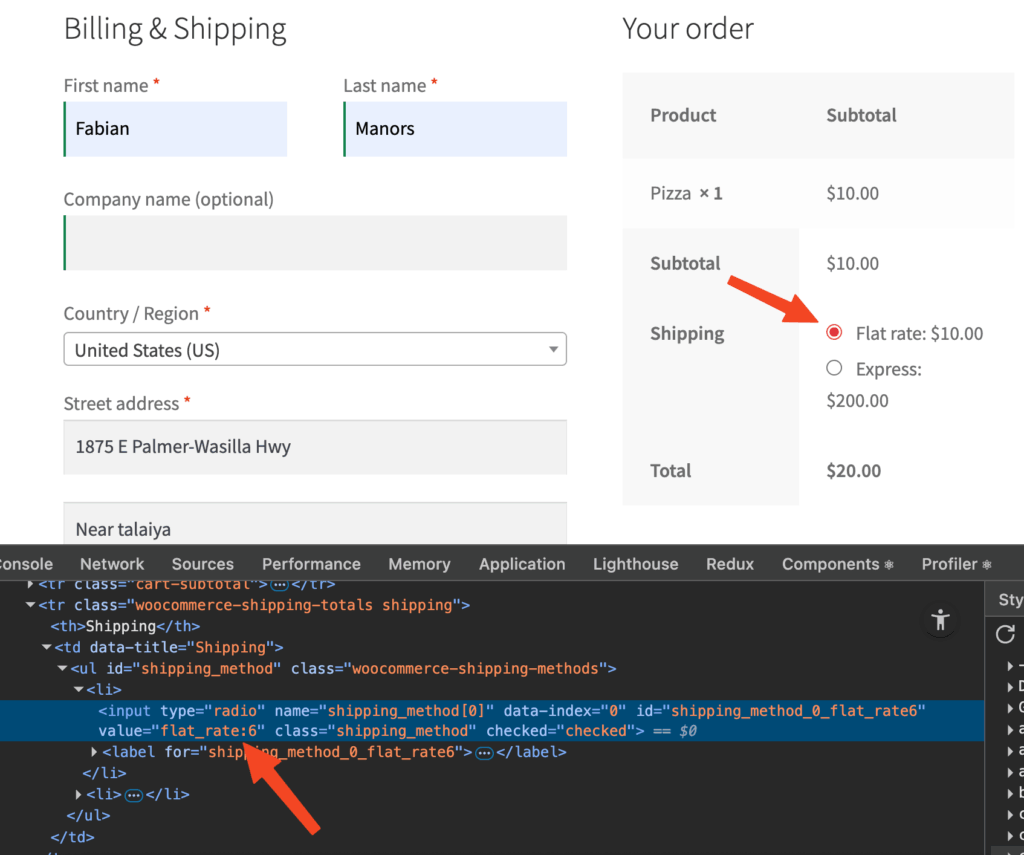
- Save your changes and test the checkout. The ASAP fee should now update automatically based on the selected shipping method.
WooCommerce Delivery Slots
Let customers choose their preferred WooCommerce delivery date and time right from your WooCommerce checkout page. With WooCommerce Delivery Slots, you can set a flexible delivery schedule to suit you and your customers.
Was this helpful?
Please let us know if this article was useful. It is the best way to ensure our documentation is as helpful as possible.