

Flux Checkout now integrates with StellarPay, the free Stripe-powered payment plugin with zero transaction fees.
Flux Checkout for WooCommerce is all about creating a fast, streamlined checkout experience that reduces checkout abandonment and boosts conversions. Now, we’re making it even easier to manage payments with full compatibility for StellarPay.
With this update, you can install StellarPay directly from the Flux Checkout settings dashboard, giving you access to a powerful (and free!) Stripe-based payment solution with zero transaction fees.
Curious? Here’s everything you need to know about using StellarPay with Flux Checkout.

StellarPay: A smarter way to handle WooCommerce payments
Payments should be simple, fast, and cost-effective – and that’s exactly what StellarPay delivers. It’s a free WordPress plugin that connects WooCommerce to Stripe, giving you all the advanced payment tools you need without the extra costs.
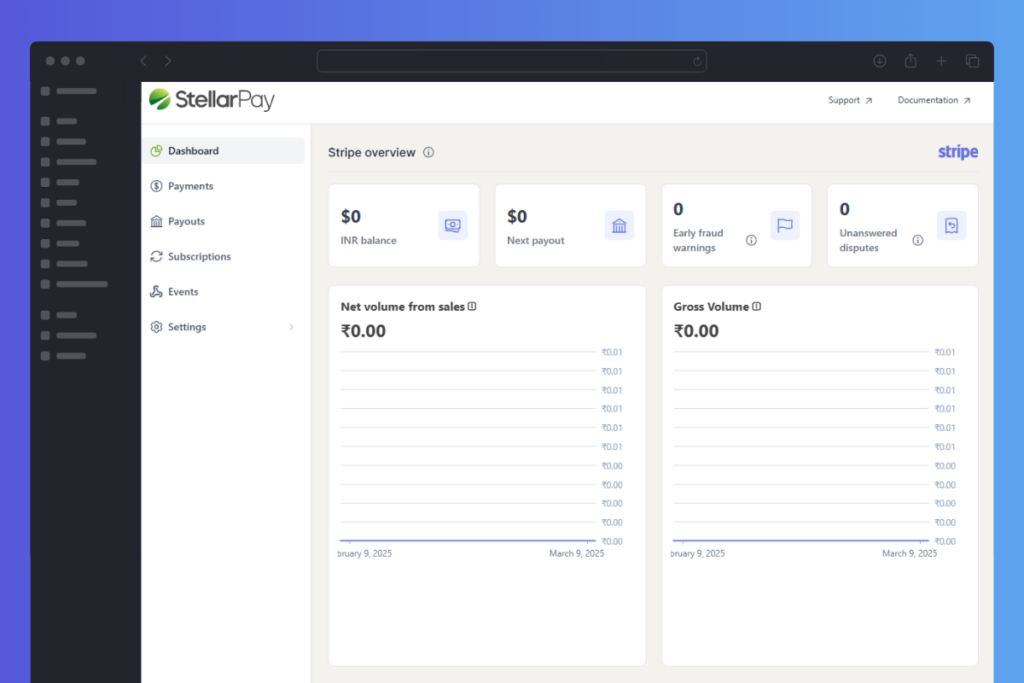
Why you’ll love StellarPay
- No transaction fees. Unlike other WooCommerce payment plugins, StellarPay doesn’t take a cut of your sales. Instead, it partners with Stripe to keep costs low.
- Hassle-free setup. Install StellarPay in minutes and start accepting payments instantly.
- More payment options, no extra plugins. Offer subscriptions, installment plans, or standard payments – all built-in, with no additional costs.
- Smart financial management. Track refunds, handle disputes, monitor failed payments, and keep tabs on your payouts – all from your WordPress dashboard.
- Designed for speed. StellarPay is lightweight and optimized to keep your store running smoothly.
Whether you are selling physical products, digital downloads, or services, StellarPay makes it easier to manage payments while keeping more money in your pocket.
Now that we know what makes StellarPay a great choice, let’s talk about how it fits perfectly with Flux Checkout.

How Flux Checkout and StellarPay work together
Flux Checkout is designed to make WooCommerce checkout faster, easier, and more customer-friendly. With the latest update, it now works hand-in-hand with StellarPay, bringing you a seamless payment experience without any extra steps or complicated setup.
Here’s why they’re a perfect match:
- Easy installation. You can install StellarPay directly from the Flux Checkout settings dashboard, no external plugin downloads are required.
- No checkout disruptions. Your customers will still experience the same smooth, distraction-free checkout they love – with a more powerful payment solution running in the background.
- Works on any WordPress site. Whether you’re running a full-fledged online shop using WooCommerce or using Stripe for standalone transactions, StellarPay will work for you.
- Built-in flexibility. Accept payments via subscriptions, installments, or one-time purchases, all from the same checkout experience.
How to get started
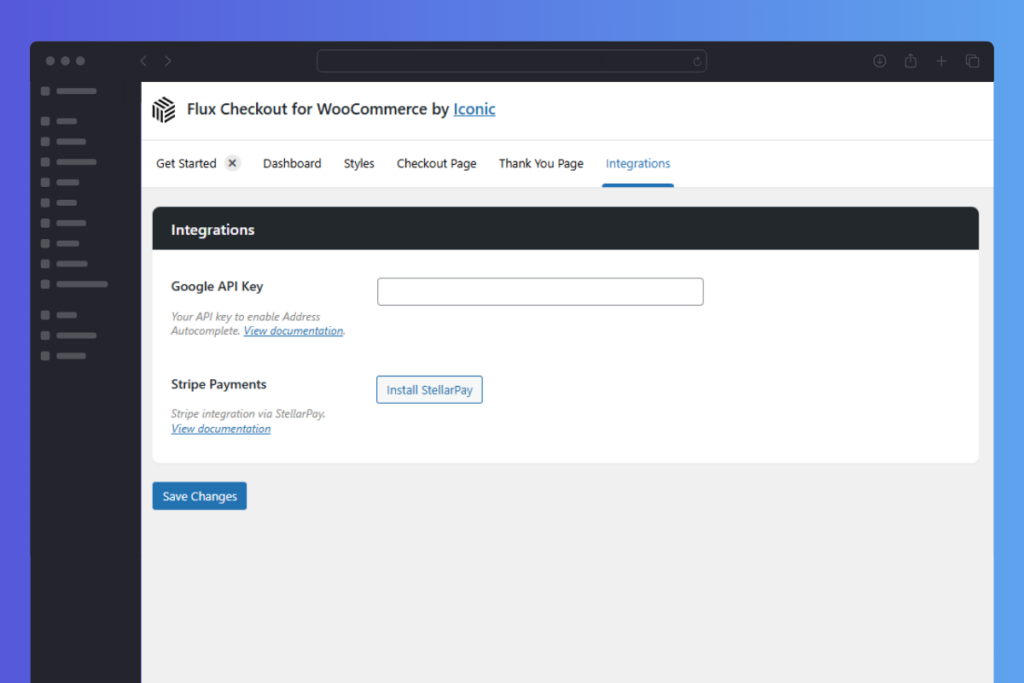
If you’re already using Flux Checkout, you can install StellarPay directly from the settings dashboard.
Here’s how:
- From your WordPress dashboard, go to Flux Checkout and click the Integrations tab at the top of the page.
- Find the Stripe Payments section and click Install StellarPay.
- Next, click Connect to Stripe and follow the setup instructions.
View the full instructions in our StellarPay and Flux Checkout guide.
If you don’t have Flux Checkout yet, now’s the perfect time to upgrade your checkout experience and integrate seamless payments with StellarPay.
Get Flux Checkout for WooCommerce today and simplify your payment process with StellarPay!
Flux Checkout for WooCommerce
Flux Checkout transforms the default WooCommerce checkout into one that’s lightning-fast, distraction-free, and reduces checkout abandonment.

Gina Lucia is our in-house Content Manager at Orderable. She writes articles, user guides, technical documentation, and creates videos on everything WooCommerce and Orderable.
Gina has been working in the WordPress/WooCommerce space since 2012 when she developed WordPress websites for clients large and small.
For the past 8 years, she’s been writing about everything WordPress and WooCommerce, becoming an expert in what makes a WooCommerce store succeed.
When not writing, Gina loves to tend to her vegetable garden, read, or travel to mainland Europe.