
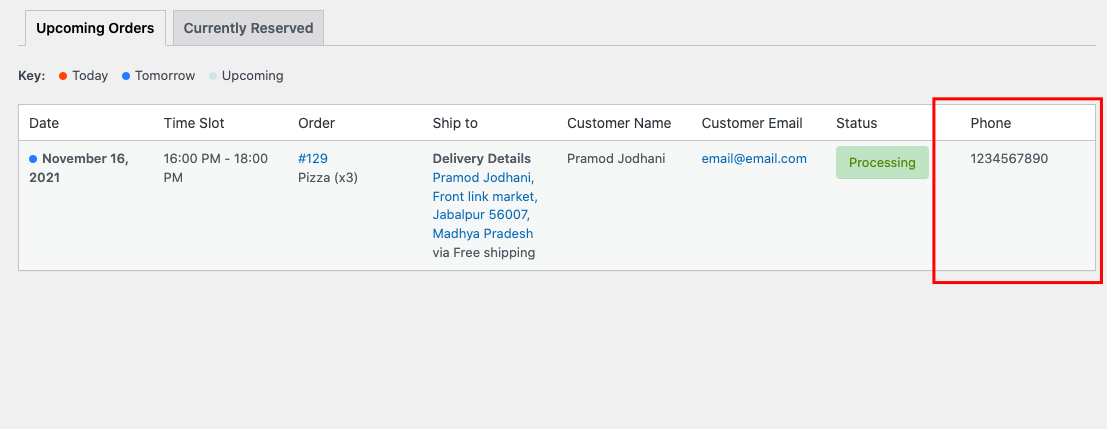
Add a Phone Number Column to the Deliveries Page
If you’re looking to add a phone number column to the deliveries page of your WooCommerce store ( WooCommerce > Delivery Slots > Deliveries), you can do so with the following snippet of code.
This snippet can be added to functions.php of the active child theme or Code Snippet plugin.
/**
 * Add phone number to to Delivery table header.
 */
function iconic_admin_add_phone_heading() {
	?>
	<th scope="col"><?php echo esc_html__( 'Phone', 'jckwds' ); ?></th>
	<?php
}

/**
 * Add phone number to to Delivery table body.
 *
 * @param Object $reservation Reservation object.
 */
function iconic_admin_add_phone_body( $reservation ) {
	$order = wc_get_order( $reservation->order_id );
	?>
	<td data-colname="<?php echo esc_html__( 'Phone', 'jckwds' ); ?>">
		<?php echo esc_html( $order->get_billing_phone() ); ?>
	</td>
	<?php
}

add_action( 'iconic_wds_admin_deliveries_table_heading', 'iconic_admin_add_phone_heading' );
add_action( 'iconic_wds_admin_deliveries_table_body_cell', 'iconic_admin_add_phone_body' );
Output:
WooCommerce Delivery Slots
Let customers choose their preferred WooCommerce delivery date and time right from your WooCommerce checkout page. With WooCommerce Delivery Slots, you can set a flexible delivery schedule to suit you and your customers.
Was this helpful?
Please let us know if this article was useful. It is the best way to ensure our documentation is as helpful as possible.